Finding the right C-stand laptop mount can unlock better posture, improved desk space, and easier access to your screen and keyboard. This guide highlights five top options that balance strength, versatility, and compatibility for most 17-inch laptops and light to mid-weight monitors. Each pick supports flexible articulation, simple mounting, and sturdy construction suitable for home offices, studios, and professional setups.
Summary of chosen products:
| Product | Brand | Compatibility | Key Benefit |
|---|---|---|---|
| WALI M00LP | WALI | Laptop up to 17″, 22 lbs; 75x75mm/100x100mm | Fully adjustable with vented platform |
| STAND-V001L | VIVO | up to 17″ laptops; 3.4″ max desk thickness | Drill-free mounting options |
| HUANUO Monitor Stand | HUANUO | 13-32″ monitors, 22 lbs; 17″ laptop tray | Two-in-one flexibility |
| MOUNT PRO | MOUNT PRO | Max 17″ laptop; 13″-32″ monitors; 22 lbs | All-metal build with modular arm |
| UPGRAVITY | UPGRAVITY | Laptop up to 17″; 32″ monitors; 17.6 lbs | Detachable vented tray |
WALI M00LP Laptop Tray Desk Mount

The WALI M00LP provides a fully adjustable laptop arm mounted on a C-clamp or through a grommet mount, designed to support laptops up to 17 inches and weight up to 22 pounds. The mounting plates are detachable, enabling both laptop and monitor use. The arm extends and retracts on a 16-inch pole and offers tilt, swivel, and rotation for ergonomic viewing angles. The vented platform helps with airflow and cooling during long sessions.
Key compatibility and features include a choice of mounting methods for different desk thicknesses (0.4”-3.5” with C-clamp, 0.4”-2.4” with a grommet), and a versatile range of motion that includes +/-15° tilt, +/-90° swivel, and 360° rotation. This model suits users seeking a robust, adjustable solution for desk setups that place the screen and laptop at comfortable heights and angles.
VIVO Single Laptop Desk Mount, STAND-V001L

The VIVO STAND-V001L offers a ventilated 14” x 11.8” tray suitable for laptops up to 17 inches and 22 pounds. It features a drill-free mounting option via a sturdy C-clamp for desks up to 3.4 inches thick, or a grommet mount up to 3 inches thick. The arm provides +90° to -90° tilt, 180° swivel, 360° rotation, and height adjustment along the center pole, delivering flexible positioning for ergonomic setups and frequent screen rotations.
This model emphasizes quick installation and broad compatibility, making it a practical choice for those who want a straightforward, adjustable laptop stand with reliable desk mounting. The option to switch between clamp and grommet mounting allows for varied desk configurations and future reassembly on different work surfaces.
HUANUO Adjustable Monitor Stand, Single Arm
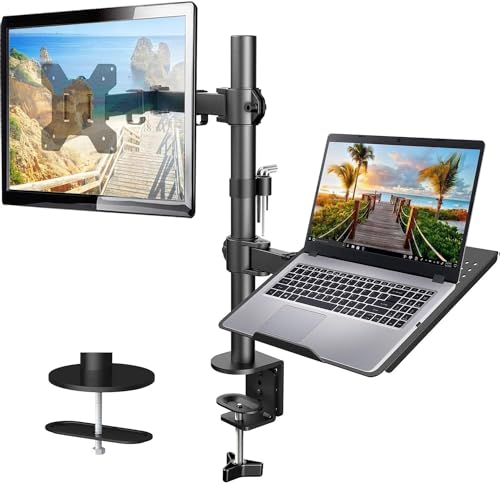
The HUANUO monitor stand combines a single monitor arm with a laptop tray, enabling both monitor and laptop to be positioned ergonomically. It supports 13-32 inch monitors (VESA 75x75mm and 100x100mm) and laptops up to 17 inches, with a maximum weight of 22 pounds. The arm offers +/-45° tilt, +/-90° swivel, and 360° rotation, and a height range up to 17 inches. The 0.8-inch lip on the laptop tray helps contain the device while allowing airflow to pass through the ventilated surface.
Designed for a two-in-one desk setup, this mount emphasizes compact footprint and flexible adjustment. The 2-in-1 design reduces desk clutter by combining laptop and monitor management into a single articulating unit, enabling users to switch between tasks quickly and comfortably.
MOUNT PRO Laptop Arm Mount
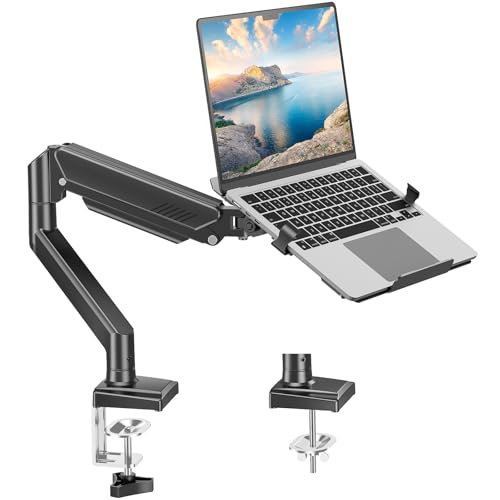
The MOUNT PRO arm mount combines a laptop tray with a monitor arm system, supporting laptops up to 17 inches and monitors from 13 to 32 inches with VESA patterns 75x75mm and 100x100mm. The setup uses an aluminum build and offers a maximum extension of about 19.9 inches, along with -45° to +90° tilt, 180° swivel, and 360° rotation. Height is adjustable up to 17.3 inches, enabling an ergonomic posture for long work sessions. The design emphasizes cable management and space efficiency, helping keep desks tidy as devices move through different tasks.
The 2-in-1 approach here is ideal for users who want a single solution to handle both a monitor and a laptop without multiple stands. It provides robust stability while maintaining broad motion range for flexible use in creative work, coding, or design tasks.
UPGRAVITY Laptop Desk Mount
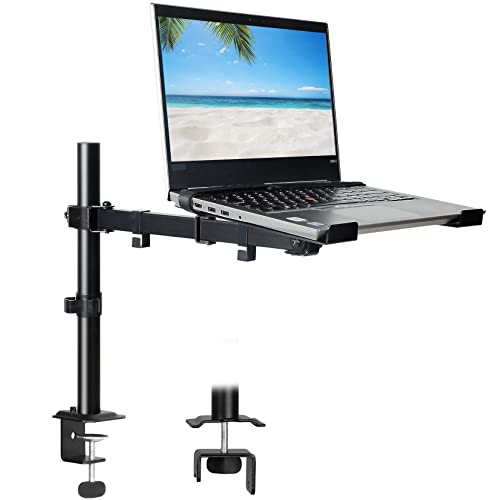
The UPGRAVITY laptop desk mount supports laptops up to 17 inches and monitors up to 32 inches with VESA patterns 75x75mm and 100x100mm, holding up to 17.6 pounds. Its detachable vented tray creates a flexible workspace where you can switch between laptop and monitor setups. The arm offers 90° tilt, 180° swivel, 360° rotation, and height adjustment along the center pole, with three joints for precise positioning. This model emphasizes ergonomic positioning and healthy viewing angles, promoting better neck and back posture during extended work sessions.
Its clamp/grommet mounting options provide versatility for various desk configurations, making it suitable for growing workspaces or shared studios where equipment needs to be reconfigured quickly.
VIVO 13–32 Inch Monitor and Laptop Desk Mount Combo

This VIVO combo supports monitors from 13 to 32 inches and laptops up to 17 inches, featuring a grommet option and a vented laptop tray. The mount offers adjustable tilt (+/-15°), 180° swivel, and 360° rotation, with a height-adjustable center pole to fine-tune the setup. It suits multi-monitor workflows where desk space is at a premium and flexibility is essential, especially in mixed-use environments such as editing suites or programming stations.
The design emphasizes ease of installation and adaptability to various desk types. A sturdy clamp or optional grommet mounting creates a stable foundation for a dynamic workspace that can be reconfigured as needs shift.
monTEK Monitor Mount and Laptop Stand

The monTEK system features two arms: one for a monitor up to 32 inches and another for a laptop tray (12–17 inches). The setup supports multiple configurations, including monitor-to-monitor, monitor-to-laptop, or other combinations to suit varied workflows. Height is adjustable, and both arms offer tilt, swivel, and rotation for precise ergonomic positioning. The dual-arm design is ideal for users who need to keep both a monitor and laptop within easy reach, without sacrificing desk space.
The mount’s versatility makes it a strong option for studios or home offices where screen real estate and device placement must adapt to different tasks, from drafting to coding to streaming. The sturdy build and compatible VESA patterns reinforce its reliability for long-term use.
Buying Guide: Key Purchase Considerations
- Compatibility: Verify laptop size (max 17 inches) and weight capacity (generally 22 pounds or less) and ensure monitor sizes and VESA patterns align with your setup (75x75mm or 100x100mm are common).
- Mounting method: C-clamp vs. grommet mounting impacts desk compatibility. C-clamp works on thinner or metal surfaces, while grommet mounts require a hole in the desk and can offer a cleaner look.
- Articulation range: Look for tilt, swivel, and rotation to achieve ergonomic viewing angles. A tall center pole with multiple joints provides the most flexible positioning for both laptop and monitor tasks.
- Ventilation and heat management: Ventilated trays help promote airflow around laptops during extended use, reducing the risk of overheating.
- Space efficiency: Dual-arm or 2-in-1 configurations save desk space by consolidating devices on a single stand, which can simplify cable management and improve workflow.
- Build quality: Metal constructions (aluminum or steel) offer higher stability and longevity, especially for heavier monitors or frequent repositioning.
- Installation: Drilling-free options are convenient, but assess whether the mounting method will hold securely on your desk surface and whether future desk changes are anticipated.
- Cable management: Some models include integrated pass-through or cable channels to keep cables organized and out of the way.
When choosing, consider your primary tasks: if you mainly type and need frequent monitor angles, a full-motion arm with a laptop tray may be best. For mixed tasks like coding, design, or video work, a 2-in-1 mount that safely supports both a laptop and a monitor can reduce clutter while offering robust flexibility. Always verify manufacturer compatibility notes and installation requirements before purchase.