When editing photos and videos, a dependable cable that transfers files quickly and without corruption is essential. This guide highlights top cables that connect cameras to computers, enabling smooth offloading, backup, and transfer workflows for American photographers and videographers. Each option covers a range of compatibility and connection types to fit Canon, Nikon, and other popular brands.
| Product | Key Benefit |
|---|---|
| ienza USB C Data Transfer Interface Cable | High compatibility with USB-C devices and many Canon/Nikon models |
| SCOVEE Camera USB Cable Cord | Extensive camera model support, versatile Mini B / USB-C style options |
| Camera IFC-400PCU USB Data Cable (ienza) | Wide Canon compatibility; reliable data transfer for various models |
| Cable Matters Mini USB to USB C Cable | Bridges legacy Mini USB devices to modern USB-C hosts |
| Tether Tools TetherPro USB 3.0 to USB-C Cable | Professional-grade tethering with fast transfer and durable build |
Note: This selection focuses on cables that directly support camera-to-computer data transfer, compatible with popular brands and common field workflows. Availability and model compatibility may vary by device and firmware.
ienza USB C Data Transfer Interface Cable

This USB-C to USB-C data cable is designed for downloading pictures and videos from cameras to PCs, laptops, or smartphones with USB-C ports. It supports MacBook, iPhone 15, and other devices with USB-C connectivity. It lists broad Canon and Nikon compatibility, including models that require specific IFC cables, and covers cameras like EOS Rebel series and various PowerShot and Vixia lines. The cable aims to simplify file transfers for modern devices while maintaining compatibility with legacy camera interfaces through listed model support.
Key considerations:
- Compatibility breadth: Canon and Nikon models listed; check exact model match for best results.
- USB-C focus: Primed for modern laptops and mobile devices with USB-C ports.
- Data transfer emphasis: Marketed for downloading media files, not charging.
SCOVEE Camera USB Cable Cord
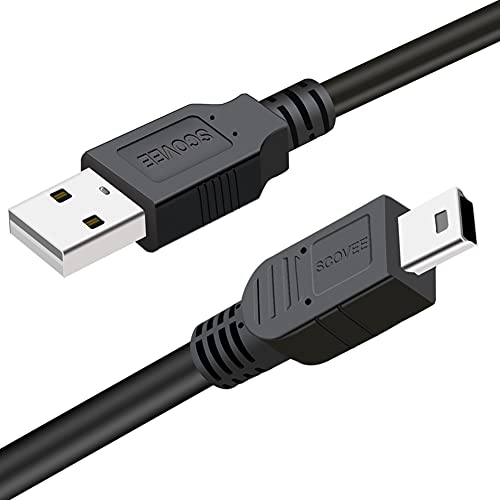
This SCOVEE cable is positioned for Canon Rebel, PowerShot, EOS, DSLR, and Vixia camcorders, enabling data transfer between camera and PC/Mac. It mentions compatibility with IFC-400PCU, IFC-200U, and IFC-500U cables and lists a broad range of compatible Canon PowerShot and EOS models. The product emphasizes transferring pictures and other files from camera to computer, suitable for photographers who rely on Mini USB 5-Pin devices and related cables.
Key considerations:
- Comprehensive Canon compatibility: Useful for many entry-to-mid-level cameras.
- Mini USB emphasis: Suits older or specific camera lines still using Mini USB connectors.
- Single-cable solution: Aimed at standard data transfer without multi-device complexity.
Camera IFC-400PCU USB Data Cable (ienza)

This cable focuses on transferring pictures and files from Canon cameras to a PC or Mac. It explicitly notes compatibility with Canon models requiring IFC-400PCU, IFC-200U, or IFC-500U. The description reiterates Mini USB 5-Pin device compatibility and lists a range of Canon PowerShot and EOS models as supported. The emphasis is on reliable data transfer for workflows involving Canon cameras with older or specialized cables.
Key considerations:
- Canon-centric compatibility: Best for Canon users needing specific IFC support.
- Usb interface alignment: Works with USB data transfer standards used by Canon cables.
- Comprehensive model list: Helpful to verify exact camera compatibility against your device.
Cable Matters Mini USB to USB C Cable

This 6.6-foot cable bridges legacy Mini USB devices with modern USB-C hosts, making it useful when a camera or accessory uses Mini USB while the computer port is USB-C. It supports data transfer up to 480 Mbps and provides 15W charging capabilities. The build highlights durability, shielding, and a reversible connector for easier plugging, essential for field shooting where reliability matters.
Key considerations:
- Legacy compatibility: Ideal for cameras or peripherals with Mini USB ports.
- Dual function: Data transfer plus charging support.
- Durability focus: Shielding and sturdy design for frequent use.
Tether Tools TetherPro USB 3.0 to USB-C Cable

The TetherPro line is designed for professional tethering workflows. This USB 3.0 to USB-C cable supports fast transfers and reliable camera-to-computer connections with a focus on on-location work. It features nickel-plated tips and gold-plated pins to meet high-performance demands, along with full shielding and a sturdy inner layer to protect signals during shoots.
Key considerations:
- Professional build: Durable and reliable for extended use in the field.
- Speed and compatibility: USB 3.0 with USB-C compatibility for modern computers.
- On-location reliability: Shielding reduces interference during transfers.
Buying Guide: Key Purchase Considerations
When choosing a camera-to-computer data cable, consider the following perspectives to match your gear and workflow.
-
<li Connector types and compatibility: Identify whether your camera uses Mini USB, USB-C, or a specific Canon/Nikon interface. Select a cable that directly supports your device’s port and the computer’s input.
- Data transfer speed: USB 3.0 and USB-C standards offer faster transfer rates, reducing offload time for large RAW files or 4K video. If you frequently back up on-site, prioritize higher speeds.
- Durability and build quality: Field use benefits from braided cables, reinforced connectors, and shielding to protect against EMI/RFI noise and bending stress.
- Length versus portability: Longer cables offer flexibility for studio and field setups, but shorter cords reduce clutter and signal loss. Balance range with ease of use.
- Brand compatibility and model lists: Some cables emphasize Canon or Nikon compatibility with IFC-400PCU/IFC-200U/IFC-500U, while others are universal across USB-C devices. Verify compatibility with your exact camera model and firmware.
- Accessory ecosystem: Some products include software licenses or additional features that improve transfer management. Factor in any included software if relevant to your workflow.
- Future-proofing: If you plan to upgrade to USB-C systems or newer cameras, favor cables that support USB-C connectivity and broad device compatibility.
- Pricing and availability: While prices aren’t listed here, compare per-feature value, warranty, and vendor reliability to pick a cable that fits your budget and needs.
Across these options, the best choice depends on your camera model lineup, preferred port type, and whether you prioritize speed, durability, or compatibility with legacy devices. For Canon-focused workflows with a need for robust tethering, TetherTools offers professional-grade connections, while cables like Cable Matters bridge older Mini USB devices to modern USB-C hosts. It’s advisable to verify the exact model list in product descriptions before purchasing to ensure a clean, error-free transfer experience.