Choosing the right conference room camera system involves balancing video quality, audio pickup, room size, and ease of use. This guide highlights five leading options that cover a range of spaces—from small huddle rooms to larger conference spaces—so teams can collaborate smoothly whether onsite or remote. Each product section includes key features, ideal use cases, and integration notes to help you compare at a glance. A concise buying guide follows to assist with informed decisions tailored to your environment.
| Product | Brand | Best For | Key Feature |
|---|---|---|---|
| TONGVEO All-in-One Conference Room System | TONGVEO | Small-to-medium rooms; all-in-one video and audio | HD 1080p/60fps with 3x optical zoom |
| Owl Labs Meeting Owl 3 | Owl Labs | Hybrid teams; 360° room view and tracking | 360° video and audio with automatic focus on speakers |
| Logitech PTZ Pro 2 | Logitech | Professional rooms; reliable PTZ control | Sharp 1080p, smooth pan/tilt/zoom |
| Pyle 4K USB Conference System | Pyle | High-resolution visuals; easy plug-and-play | 4K video with AI framing |
| TOUCAN 360-Degree Conference Camera | TOUCAN | Everywhere; 360° view with AI tracking | 1080p, AI tracking with multiple mics |
TONGVEO All-in-One Conference Room Camera System

The TONGVEO All-in-One system combines a 1080p HDMI PTZ camera with a Bluetooth speakerphone in a single package, designed for small-to-medium conference rooms. The setup supports simultaneous video and audio output via HDMI and USB 3.0, enabling quick integration with common video platforms. With 3x optical zoom and a broad 350° horizontal and 180° vertical range, the camera covers most meeting spaces, while the built-in mic array provides clear capture up to about 16.4 feet. The Bluetooth speakerphone supports long sessions on a charged battery, making it a flexible, space-saving option for teams that want an all-in-one solution.
TONGVEO 4K Conference Room Camera System
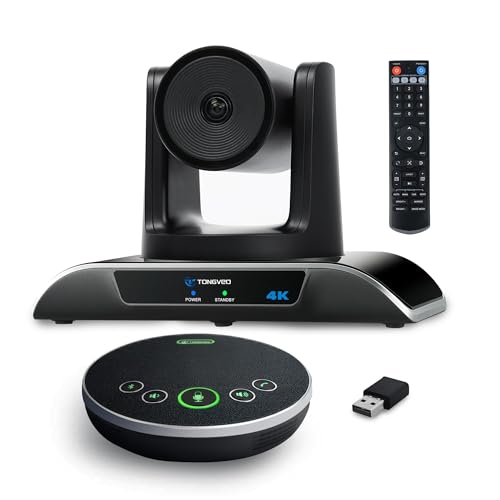
This 4K PTZ system emphasizes AI auto-tracking and gesture control, offering a robust feature set for larger rooms or dynamic meetings. With 6 gesture controls and a 120° wide field of view, the camera tracks faces and moves between multiple participants efficiently. A 5x digital zoom, 350° horizontal and 180° vertical rotation ensure flexible framing, while USB 3.0 Plug & Play makes setup straightforward. The built-in speakerphone delivers full-duplex audio with a long battery life for mobility within the room, supporting Zoom, Teams, YouTube and more.
Owl Labs Meeting Owl 3

The Meeting Owl 3 delivers a 360° view with 360° audio coverage, automatically focusing on speakers to foster active participation in hybrid settings. Its all-in-one design simplifies deployment—plug-and-play USB setup and centralized management through Owl’s Nest platform for admins overseeing multiple devices. The system’s AI-driven Owl Intelligence System selects the best in-room view, helping remote participants see the active speaker clearly. It’s particularly suitable for classrooms, conference rooms, or brainstorming spaces that benefit from a wide, immersive perspective.
Pyle 4K USB Conference Room Camera System

Pyle’s 4K USB system focuses on high-resolution video and AI framing to keep participants in view during meetings. The 120° field of view and AI tracking help maintain a balanced shot across the room, while MEMS microphone arrays enhance voice clarity. Its plug-and-play compatibility with Zoom, Teams and other platforms makes it a practical choice for home offices to mid-size conference rooms. The camera supports multi-platform use and is designed for easy integration into existing collaboration workflows.
TOUCAN 360-Degree Conference Camera
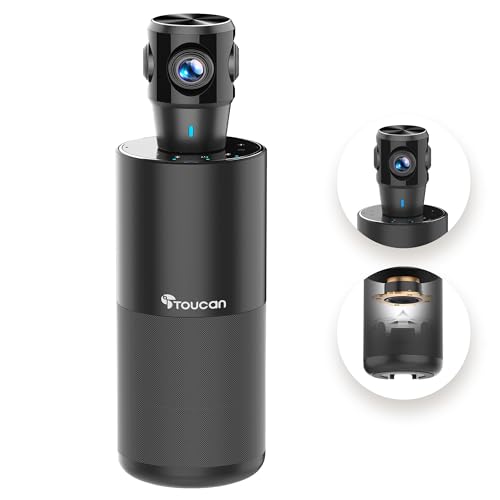
TOUCAN offers a 360-degree coverage solution with AI tracking and a built-in microphone array. The camera is designed for office environments where a single device should capture all participants and audio clearly. It supports 1080p video, 4 noise-reduction microphones, and compatibility with major platforms like Zoom and Teams. The plug-and-play setup reduces IT overhead, and the AI tracking helps highlight active speakers in hybrid meetings without manual adjustments.
Buying Guide: Key Purchase Considerations
- Room size and coverage: For small spaces, compact all-in-one systems are sufficient. For larger rooms, look for wide FOV and intelligent tracking to avoid blind spots.
- Video resolution and frame rate: 1080p is common and sufficient for most meetings; 4K is ideal for detailed visuals in larger rooms but requires more bandwidth and processing.
- Audio pickup and noise management: A robust microphone array and echo cancellation are essential. Consider systems with full-duplex capabilities for natural conversations.
- PTZ vs. fixed or auto-tracking: PTZ cameras offer flexible framing, while auto-tracking or 360° cameras reduce manual control and simplify use in dynamic meetings.
- Connectivity and compatibility: USB 3.0/USB-C and HDMI outputs support direct connections to laptops and room PCs. Ensure compatibility with Zoom, Teams, Google Meet, and OBS if streaming aligns with your workflow.
- Ease of deployment: Plug-and-play setups and Bluetooth or wireless options minimize IT overhead. Consider whether a single all-in-one solution or modular components better suit your environment.
- Power and battery: Battery-powered speakerphones add mobility but verify battery life aligns with meeting duration. Ensure reliable USB-C or dongle-based connections when needed.
- Management and scalability: For organizations, centralized device management helps with firmware updates and configuration across multiple rooms.
Multi-Perspective Comparisons
- All-in-one vs modular: All-in-one bundles reduce clutter and setup time but may limit upgrade paths. Modular systems allow mixing camera, mic, and speaker components to fit larger rooms or evolving needs.
- 360° views vs focused framing: 360° devices are great for sharing overall room presence, while fixed or PTZ cameras provide precise framing for keynote speakers or presenters.
- AI tracking and gesture control: AI-driven tracking can significantly reduce manual camera control in busy meetings, though some setups require calibration and controlled lighting to perform optimally.
- Wired vs wireless: Wireless systems (5.8 GHz) offer flexibility but may require careful setup to avoid interference. Wired connections provide stability and lower latency for mission-critical rooms.
- Platform compatibility: Ensure chosen devices smoothly integrate with your primary videoconferencing tools and any room controller software you use.