For creators and professionals alike, a dependable live-streaming camera is essential. This guide highlights five reliable options that balance video quality, autofocus, and ease of use across popular streaming platforms. Each pick is evaluated on image clarity, audio integration, flexibility, and overall performance for live streams, gaming, and online meetings.
| Product | Brand | Key Feature |
|---|---|---|
| Logitech StreamCam Premium Webcam | Logitech for Creators | 1080p60 with premium glass lens and smart autofocus |
| EMEET S600 4K Webcam | EMEET | 4K at 30FPS, PDAF autofocus, low-light balance |
| Logitech for Creators Mevo Start | Logitech for Creators | Wireless 1080p streaming, mobile app control |
| Logitech C922x HD Pro PC Webcam | Logitech | 1080p60, HD light correction, versatile for desktop |
| EMEET SmartCam S800-4K | EMEET | 4K@30FPS with HDR, flexible height and tilt |
Logitech StreamCam Premium Webcam for Streaming and Content Creation

The StreamCam is designed for creators needing clear, fluid 1080p video at 60 frames per second. It features a premium glass lens and smart autofocus to deliver sharp, natural images across lighting conditions. Its versatility makes it suitable for streaming on platforms like Twitch, YouTube, and video conferencing. The device integrates well with popular software and hardware setups, providing a stable, professional-looking stream with minimal post-processing.
Key highlights include Full HD 1080p at 60 fps for crisp motion and color accuracy, plus a premium lens setup that enhances detail and contrast. Its autofocus system maintains focus on you even during movement, helping keep your face crisp as you gesture or shift position. This webcam is compatible with a wide range of streaming solutions and works reliably for live video creation.
EMEET S600 4K Webcam for Streaming

The S600 delivers 4K streaming via a Sony 1/2.5” sensor with advanced PDAF autofocus and light balance. It supports multiple resolutions, including 4K at 30FPS or 1080p at 60FPS, to suit different content needs. Built-in noise-reducing mics improve audio capture, while the wide field of view can accommodate single-host or group streams. Practical for live commerce, gaming, and beauty tutorials, it emphasizes image fidelity and audio clarity in dynamic scenes.
Notable features include a robust autofocus system, automatic exposure adjustments for varying lighting, and flexible field of view when shooting at 1080p. The camera’s HDR and noise-control capabilities help maintain intelligible sound and clear visuals in less-than-ideal environments, making it a strong option for creators who publish varied content.
Logitech for Creators Mevo Start
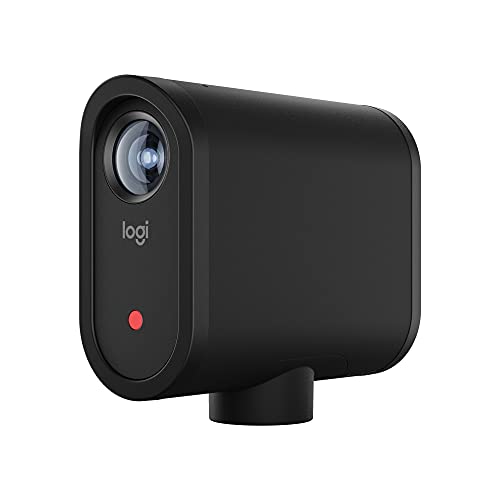
The Mevo Start offers flexible wireless streaming from anywhere, using Wi-Fi or LTE via the app. It streams in 1080p and supports multi-camera setups with other Mevo devices, enabling versatile storytelling from multiple angles. The camera is designed for mobile creators and event coverage where cables are impractical, with intelligent app features that help automate framing and transitions for professional-looking broadcasts.
With built-in control through an intuitive app, users can adjust framing, exposure, and audio levels without a computer. The compact form factor and LTE/Wi-Fi options make it ideal for on-the-go streaming, live interviews, or remote shoots where flexibility is essential.
Logitech C922x HD Pro PC Webcam

The C922x Pro is a reliable workhorse for live streaming and conferencing. It delivers 1080p at 60 fps for smooth video and includes HD lighting adjustments to optimize visuals in low-light settings. The autofocus system keeps subjects sharp, while software features facilitate quick content creation and sharing. It pairs well with conferencing tools like Teams, Meet, and Zoom, and remains a solid choice for desktop-based streaming and meetings.
Additionally, the camera is noted for its versatility across platforms and its compatibility with Nintendo Switch 2’s GameChat mode, ensuring broad functionality across devices and use cases. It’s a practical, well-rounded option for users seeking dependable performance without complex setup.
EMEET SmartCam S800-4K

The S800-4K brings a true 4K experience with HDR support and PDAF/TOF dual-autofocus, ensuring sharp detail in fast-paced scenes. It offers a variable FOV and a height-adjustable tripod setup, allowing flexible framing from near to full-body shots. With 4K at 30FPS and 1080P at 60FPS, creators can choose the resolution that balances bandwidth and quality. The HDR feature helps preserve detail in both bright and dark areas, making it a solid option for diverse live-stream environments.
The camera’s tripod compatibility and 6.7 to 18.5-inch height range provide practical versatility for creators who need different perspectives, from desk setups to standing streams. HDR and advanced autofocus help maintain a consistent image across varying conditions, which is valuable for long-form broadcasts and tutorials.
Buying Guide: Key Purchase Considerations
- Resolution and frame rate: Prioritize 1080p at 60fps for smooth, professional-looking streams. If your bandwidth is limited or you primarily publish short clips, 1080p at 30fps or 720p can still be effective.
- Autofocus and exposure: Look for fast, reliable autofocus (PDAF or similar) and smart exposure features to keep you in frame and well lit as lighting changes.
- Low-light performance: HDR, noise reduction, and automatic light balance improve video quality in dim environments, which is common in home studios.
- Audio quality: Built-in mics and the option to connect external mics matter for clear voice transmission during live streams or calls.
- Flexibility and mounting: Consider a camera with a stable tripod option or a form factor suitable for desk setups, with adjustable angles and heights for different stream formats.
- Connectivity and software: USB-C or USB-A compatibility and software controls (auto-framing, scene presets) simplify setup and content creation workflows.
- Mobility and multi-camera options: If you plan multi-angle streams, devices like Mevo Start or Mevo-compatible kits enable multi-camera workflows without extensive wiring.
- Platform compatibility: Ensure the camera works well with your preferred streaming software (OBS, Streamlabs, XSplit) and conferencing tools (Teams, Meet, Zoom).
All five selections above provide robust options for live streaming needs—from fixed desktop setups to mobile, wireless publishing workflows. The best choice depends on your balance of video fidelity, ease of use, and whether you prioritize 4K resolution, wireless flexibility, or integrated automation features. Evaluating your typical lighting, space, and platform requirements will help identify the most suitable camera for your live broadcasts.