Looking for a webcam that pairs high-quality video with a reliable built-in microphone? The following five cameras mix crisp visuals with clear audio, making them ideal for meetings, streaming, and content creation. Below you’ll find quick picks, feature highlights, and a buying guide to help you choose the right model for your setup.
| Product | Brand | Notable Mic/Audio Feature |
|---|---|---|
| Logitech Brio 101 Full HD 1080p Webcam | Logitech | Built-in microphone for clear calls |
| EMEET C960 Webcam | EMEET | Built-in 2 noise-reduction mics |
| Galyimage 4K Webcam | Galyimage | Dual noise-canceling microphones, ring light |
| GOZVRPU 1080P HD Webcam | GOZVRPU | Built-in noise-canceling microphone |
| EMEET S600 4K Webcam | EMEET | 2 noise-reduction mics, clear audio |
Note: All models listed support typical desktop video conferencing software and USB connections. Specifications may vary by package, so review the product pages for the latest details.
Logitech Brio 101 Full HD Webcam With Built-In Mic

Logitech Brio 101 offers full HD 1080p video with a built-in microphone designed for clear voice capture during meetings and streams. It includes RightLight technology to brighten your image and reduce shadows, ensuring you look your best in various lighting conditions. The camera is compatible with popular platforms like Zoom and Microsoft Teams, and is tuned for reliable performance on laptop and desktop setups. A shutter adds privacy when the camera is not in use.
EMEET C960 1080P Webcam With Two Mics

The EMEET C960 features full HD 1080p video with two built-in noise-reduction microphones for clearer voice pickup and reduced ambient noise. Its fixed focal length ensures a consistent, sharp image from a practical distance for home offices and students. The camera includes a privacy cover and light correction to help you stay visible in varied lighting environments, making it a solid choice for everyday video calls.
Galyimage 4K Webcam With Ring Light And Dual Mics

This 4K webcam combines high-resolution video with a built-in ring light and dual noise-canceling microphones. The ring light offers three color temperature settings for flattering lighting in any room, while the dual mics help deliver clear voice capture even in modestly noisy environments. Autofocus aids in keeping subjects sharp during dynamic scenes, making it a strong option for streamers and remote workers alike.
GOZVRPU 1080P HD Webcam With Built-In Microphone
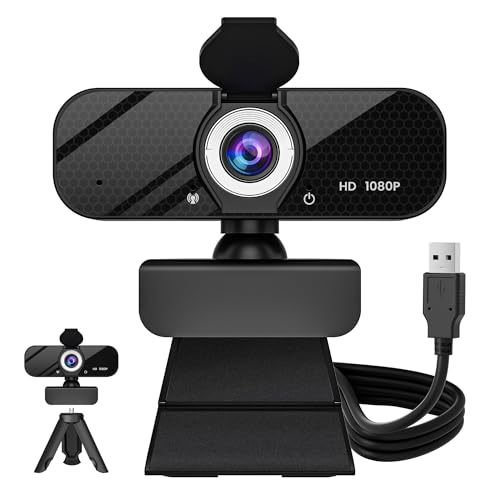
This GOZVRPU webcam provides 1080p video with an integrated microphone designed to capture clear voice in calls and streams. It emphasizes automatic light correction to maintain a balanced image in varied lighting, making it suitable for home offices and classrooms. The wide compatibility with common conferencing software supports easy setup and use across devices.
EMEET S600 4K Webcam For Streaming

The EMEET S600 brings 4K streaming capability with a Sony sensor option and PDAF autofocus for fast, stable focus. It includes two noise-reduction microphones and a privacy cover to protect your workspace. Automatic light balance helps maintain image quality in changing light, while customizable FOV options and built-in speakers support multimedia tasks beyond video calls.
Buying Guide: Key Purchase Considerations
- Video resolution and frame rate: If you primarily attend meetings, 1080p at 30–60fps is typically sufficient. For streaming or content creation, 4K at 30fps or higher frames, if supported, yields crisper detail.
- Microphone quality: Look for built-in noise reduction or dual-microphone arrays to improve voice clarity in noisy environments. Consider mics with auto-sensitivity and wind or ambient noise suppression.
- Autofocus and field of view: Autofocus helps keep you sharp as you move. A wider FOV captures more of your surroundings, which is useful for desk setups or demos; tighter FOV is better for solo speaking.
- Low-light performance: Automatic light balance and ring lights (in some models) help maintain visibility in dim rooms. A camera with good low-light compensation reduces reliance on external lighting.
- Privacy features: A physical lens privacy cover is a simple, effective way to protect privacy when not in use.
- Compatibility and software: Ensure compatibility with your preferred platforms (Zoom, Teams, etc.). Some cameras offer dedicated software for exposure, white balance, and mic control.
- USB interface and power: Most webcams use USB-A or USB-C; ensure your computer has the appropriate port. Some models include adapters for cross-compatibility.
- Build and ease of use: Plug-and-play setups with straightforward mounts or tripods simplify installation, especially in small workspaces.
In multi-perspective usage, users prioritizing video quality might favor 4K webcams with dual mics and robust light balance, while those focusing on conference calls may prefer reliable 1080p options with strong auto-light adjustment and privacy covers. Budget considerations, desk space, and software preferences will guide the best overall fit.