Choosing the right camera setup for your computer monitor can boost video calls, streaming, and online collaboration. This guide highlights top monitors with built-in webcams and external options that pair well with larger displays. Each entry focuses on image quality, audio clarity, and compatibility to help you pick a dependable setup for work, school, or remote meetings. Below is a quick snapshot of five strong picks across built-in and external camera options.
| Product | Type | Key Benefit |
|---|---|---|
| Philips 34E1C5600HE | Monitor with built-in webcam | UltraWide display with built-in Windows Hello webcam and noise-canceling mic |
| ASUS BE24EQK | Monitor with built-in webcam | Frameless 24″ Full HD with integrated 2MP webcam and mic array |
| ASUS BE279QFK | Monitor with built-in webcam | 27″ Full HD IPS with integrated webcam and clear audio options |
| MSI PRO MP272PMG | Monitor with built-in webcam | 27″ IPS, 1080p, 120Hz, webcam and mic array for smooth video conferencing |
| Shcngqio 1080P Webcam | External webcam | High-definition 1080p with noise-canceling mic and automatic light correction |
Philips 34E1C5600HE 34″ UltraWide Camera Monitor

The Philips 34E1C5600HE combines a broad 3440 x 1440 UltraWide QHD panel with a curved 1500R display for immersive multitasking. It includes a built-in Windows Hello webcam and a noise-canceling microphone for clearer calls, plus USB-C docking and stereo speakers. The wide color gamut and Ultra Wide-Color technology enhance on-screen clarity for both work and entertainment, supporting productivity-heavy workflows across multiple apps without switching windows.
Shcngqio 1080P HD Webcam with Microphone

This external webcam delivers 1080p HD video with a wide-angle lens and a noise-reducing built-in microphone. Automatic light correction helps maintain image clarity in varying lighting environments, making it a versatile option for meetings, online teaching, or streaming. The plug-and-play setup suits most laptops and desktops without additional software.
Logitech Brio 101 Full HD Webcam

The Logitech Brio 101 offers robust compatibility with major video platforms and features advanced auto-light balance to brighten scenes. It includes a built-in microphone and supports high-quality video calls across various devices, making it a flexible choice for those who need a reliable external webcam with broad software support.
ASUS BE279QFK 27″ Be Screen with Built-In Webcam

This 27-inch Full HD monitor pairs an IPS panel with a built-in webcam, mic array, and stereo speakers. It’s designed for telecommuting and online learning, offering wide viewing angles and color accuracy. Its integrated webcam facilitates video conferences without needing a separate device, while the overall package supports a compact, all-in-one desk setup.
ASUS BE24EQK 23.8” Business Monitor
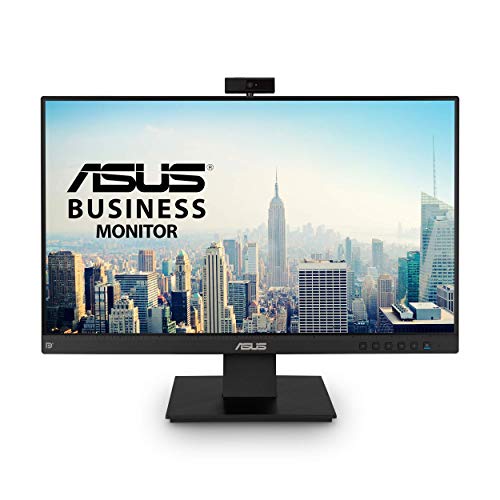
ASUS BE24EQK delivers a 24-inch Full HD IPS experience with a frameless design and integrated 2MP webcam plus microphone array. It’s tailored for business use, with wide viewing angles and clear audio for meetings and online collaboration. The compact form factor fits small desks while maintaining essential conferencing features.
SKitphrati 27” Business Webcam Monitor

The SKitphrati 27-inch business monitor emphasizes conferencing with a built-in 3MP webcam, mic array, and frameless design. It supports multiple connections (HDMI, DisplayPort, VGA, USB 2.0) for easy integration with different devices, making it a versatile choice for modern workspaces that value video clarity and flexible connectivity.
Buying Guide
- Camera placement and field of view: Built-in cameras save desk space, but consider whether you need a wide-angle lens (for group calls) or a narrow, focused view (for personal video). External webcams can provide flexible positioning.
- Video quality and resolution: Look for at least 1080p if you frequently video conference. Some monitors offer higher color accuracy and better low-light performance; check sensor specs and color gamut when eye contact and clarity matter.
- Microphone quality and noise suppression: Built-in mics on monitors vary in pickup range. External mics or USB headsets with noise suppression can improve vocal clarity in noisy environments.
- Connectivity and docking: USB-C docking on monitors can simplify cable management and power delivery. Ensure your computer supports the monitor’s connectivity and that you have compatible ports.
- Software compatibility: Verify compatibility with popular platforms (Zoom, Teams, Meet). Some webcams include features like auto-light correction and background privacy modes; ensure they fit your workflow.
- Ergonomics and eye comfort: For long sessions, consider monitors with eye-care features (low blue light, flicker-free tech) to reduce fatigue alongside a comfortable camera setup.
- Security and privacy: Built-in webcams with shutter or physical covers add a privacy layer. If privacy is a priority, choose models with accessible covers or robust stiffness in the shutter mechanism.
- Budget and upgrade path: Built-in camera models are convenient but can limit upgrade options. If you anticipate upgrading microphones or lighting, an external webcam or mic might be more adaptable long-term.