Choosing the right webcam can dramatically improve video calls, virtual meetings, and online classes. The following selection focuses on reliability, image quality, built-in microphones, and ease of use across popular platforms like Zoom, Teams, and Google Meet. Each option is tailored for different spaces—from compact desk setups to larger conference areas—while prioritizing clear audio, accurate color, and minimal setup time.
| Product | Resolution & Frame Rate | Audio & Extras | Best For |
|---|---|---|---|
| Logitech C920x HD Pro | Full HD 1080p/30fps | Clear audio, HD light correction, autofocus | |
| NexiGo N60 | 1080p/30fps | Built-in noise-canceling mic, software controls | home offices, remote work |
| Logitech Brio 101 | 1080p/60fps capable, RightLight | Built-in mic, auto-light balance | high-quality video, media sharing |
| Owl Labs Meeting Owl 3 | 360° 1080p video | 360° mic pickup, AI speaker-tracking | small to medium conference rooms |
| SZGIARUY 1080P Webcam | 1080p/30fps | Noise-canceling microphone, automatic light correction | budget-friendly video calls |
Below are five carefully chosen cameras that balance image quality, audio clarity, and plug-and-play simplicity for American users conducting video conferences across popular platforms.
Logitech C920x HD Pro PC Webcam

The Logitech C920x HD Pro offers Full HD 1080p video at 30fps with automatic light adjustment and sharp autofocus. Its color and brightness adapt to varying lighting, improving visibility in home offices or desks with mixed light. The built-in microphone provides stereo sound for typical meetings, enabling clear communication without external audio hardware. Compatibility with major video conferencing platforms makes it a versatile choice for everyday calls and streaming.
Key features include HD light correction, autofocus, and solid software integration for easy content sharing. This webcam works well as a desktop camera or monitor webcam, delivering reliable performance in standard meeting rooms and on the go.
Shcngqio 1080P HD Webcam with Microphone

The Shcngqio 1080P webcam provides a wide-angle view and a built-in noise-canceling microphone. Its automatic light correction ensures consistent brightness across dim or bright environments, making it suitable for cluttered desks or rooms with mixed lighting. The plug-and-play USB connection keeps setup simple for remote workers, students, and educators who need dependable video quality without extra software downloads.
Ideal for video calls, webinars, and live streaming where clarity and voice quality matter. Its wide angle helps capture more of the environment during team discussions or classroom sessions.
NexiGo N60 1080P Webcam

The NexiGo N60 delivers 1080p video at 30fps with a fixed focal length that covers a wide field of view up to 110 degrees. This makes it well-suited for small group calls or crowded desks where participants need to be visible. The built-in noise-canceling microphone reduces ambient noise, improving voice clarity during busy home environments or shared workspaces. Software controls allow FOV and exposure adjustments to fit personal preferences and room conditions.
Plug-and-play setup and software-based fine-tuning make it a practical choice for Zoom, Skype, and Teams meetings, enabling a balanced, reliable video presence with minimal configuration.
Logitech Brio 101 Full HD 1080p Webcam

Logitech Brio 101 focuses on high-quality color and brightness with RightLight enhancement, delivering clearer video in mixed lighting. The built-in microphone helps ensure your voice is heard clearly during meetings, while the webcam’s broader compatibility supports conferencing platforms and streaming tasks. Its compact design fits neatly on most desks, offering a premium option for those requiring crisp 1080p output and consistent performance.
The Brio 101 emphasizes ease of use, reliable performance, and strong image processing to keep you visible and professional on camera during long sessions.
MTORED USB HD 1080P Webcam

The MTORED webcam offers Full HD 1080p video with automatic light correction to optimize brightness and color in various lighting conditions. A built-in microphone reduces background noise for clearer speech during calls. The package includes a rotatable tripod and privacy cover, enabling flexible desk setups and quick lens protection when not in use. It is a practical choice for remote workers, students, and small business users seeking a budget-friendly option without sacrificing essential features.
Its portability, combined with reliable video and audio quality, makes it suitable for home offices or travel setups where quick deployment matters.
Logitech MeetUp Video Conferencing System
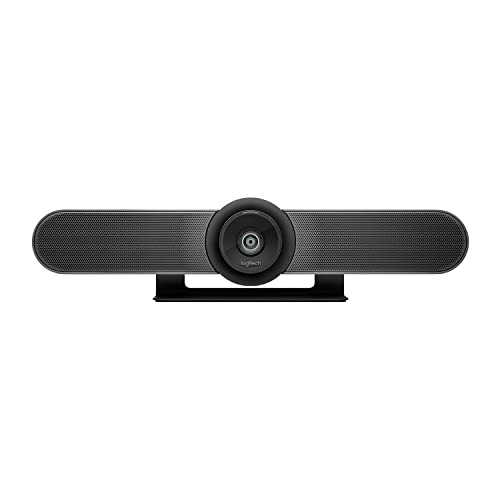
The MeetUp system is designed for small huddle rooms with a 120° wide field of view, an ultra HD 4K sensor, and built-in speakers and mics. It suits collaborative sessions where multiple participants are present in the same room. The device focuses on room-scale capture and sound, enabling a cohesive in-room and remote experience. While it is more of a complete system than a single webcam, it remains a strong option for teams seeking an all-in-one solution for video conferencing.
Ideal for dedicated meeting spaces, it helps deliver a unified videoconferencing experience with solid image and audio performance in compact rooms.
1080P HD Webcam for PC by SZGIARUY
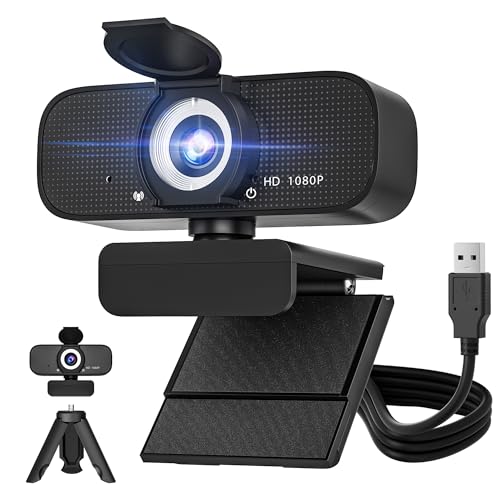
The SZGIARUY 1080P webcam offers a straightforward, budget-friendly option with a built-in microphone and automatic light correction. It is designed for plug-and-play use with USB connections, making it a practical choice for students and remote workers who need reliable video on a budget. The camera’s software-free setup emphasizes simplicity and quick start-up for routine video calls and classes.
With dependable performance and a lower price point, it serves as a solid entry-level choice for everyday video meetings and streaming tasks.
Buying Guide
- Resolution and frame rate: For crisp, smooth video in most meetings, aim for 1080p at 30fps; some models support higher frame rates or 4K, which is beneficial for large rooms or streaming needs.
- Low-light performance: Look for RightLight or automatic light correction to maintain natural color and brightness in varying lighting conditions.
- Audio quality: Built-in microphones with noise cancellation improve voice clarity in noisy environments; consider external mics if multiple participants are often speaking.
- Field of view: A wider FOV helps capture more participants in small rooms or desks, but may require closer positioning for focused shots.
- Compatibility and setup: Choose USB plug-and-play devices that support major platforms (Zoom, Teams, Google Meet). Software controls should be easy to use for quick adjustments.
- Privacy and security: Models with privacy shutters or physical covers protect privacy when the camera is not in use.
- Form factor and mounting: Compact designs fit on laptops or monitors; consider tripods or mounting options for fixed rooms or multiple setups.
- Cost of ownership: Balance price with feature needs, such as AI tracking, 360-degree capture, or room-scale audio, to match the intended use.