Choosing the right digital camera for a school setting means balancing simplicity, durability, and image quality. The following five cameras are suitable for classrooms, student projects, field trips, and basic photography lessons. Each option offers straightforward controls, reliable performance, and features that help students learn without getting overwhelmed by advanced settings. This guide compares key specs and practical uses to help schools pick devices that fit curricula and budgets.
| Product | Brand | Megapixels / Video | Key Feature |
|---|---|---|---|
| Digital Camera, 44MP Compact Camera (Deep Green) | Gtonster | 44MP / 1080p | 16x zoom, face detect, smile capture |
| 4K Digital Camera for Photography – 50MP | Ploomen | 50MP / 4K | 180° flip screen, webcam mode |
| Digital Camera, FHD 1080P with 16x Zoom | CAMKORY | 1080p / 44MP | Easy for kids, automatic tone |
| Digital Camera 4K, 64MP Autofocus | Hiacinto | 64MP / 4K | Anti-shake, compact travel design |
| 4K Digital Camera, Autofocus, 16x Zoom | TEFTYMON | 64MP / 4K | 180° flip screen, built-in WiFi |
Across classrooms, these cameras support student-led projects, journalism assignments, and visual data collection. They emphasize ease of use, quick setup, and robust features like face detection, anti-shake stabilization, and long battery life. The selection prioritizes devices that can be operated by younger students with minimal prior training, while still offering enough capability for meaningful learning outcomes.
Gtonster 44MP Compact Camera — Deep Green

The Gtonster 44MP Compact Camera is designed for entry-level photography, making it well-suited for student use. It offers FHD 1080P video and 44MP stills, providing clear results for classroom projects. A 16x digital zoom helps students explore faraway subjects during fieldwork, while features like Smile Capture and Face Detect support engaging, easy photography sessions. The camera aims to minimize setup complexity, helping teachers integrate photography into lesson plans without technical hurdles.
Ploomen 4K Digital Camera — 50MP

The Ploomen camera emphasizes 4K video and high-resolution photography in a compact form, suitable for student projects and classroom demonstrations. A 2.8-inch IPS 180° flip screen supports self-recording and teacher-led demonstrations, while the ability to function as a webcam adds versatility for remote learning or reporting tasks. This model balances portability with professional-level features, helping students create polished multimedia assignments without advanced expertise.
CAMKORY Digital Camera — 16x Zoom
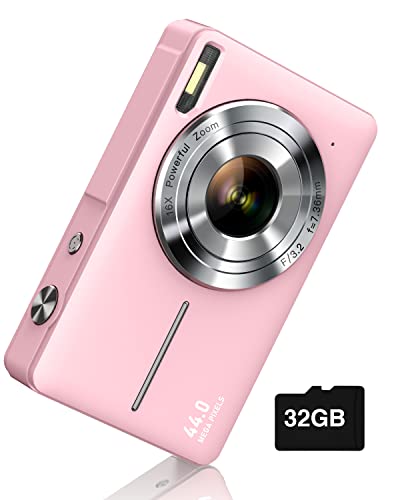
The CAMKORY model focuses on user-friendly operation with FHD 1080P and 44MP stills, making it ideal for younger students discovering photography. Its ergonomic design and simple menu minimize the learning curve, while automatic features help produce natural-looking images without extensive manual adjustments. The camera’s small form factor and efficient battery behavior support extended classroom sessions and field trips.
aycy Digital Camera — 48MP 4K

The aycy camera targets younger students with a combination of 48MP stills and UHD 4K video. Built for portability and simple operation, it includes a fill light to improve performance in low light. Features such as anti-shake and a compact build support reliable, crisp results during classroom activities, field trips, and after-school projects. The included USB-C charging keeps charging straightforward for busy school schedules.
Hiacinto 4K Camera — 64MP Autofocus

The Hiacinto model emphasizes a higher MP count and 4K video, suitable for more advanced student projects and journalism assignments. Its anti-shake technology helps maintain clarity in dynamic shooting scenarios such as sports events or outdoor fieldwork. The compact design makes it easy to pass among students during group activities, while the 4K output enables sharp, detailed documentation of experiments and presentations.
TEFTYMON 4K Camera — 64MP, 16x Zoom

The TEFTYMON camera blends 4K video and 64MP photos with a 3.0-inch 180° flip screen, facilitating versatile vlogging and classroom demonstrations. Its built-in WiFi supports quick file transfers to phones or school networks, aiding in immediate project sharing and collaborative editing. The 16x digital zoom and ergonomic design support hands-on learning and classroom storytelling with a professional feel.
Buying Guide: Key Purchase Considerations For Schools
- Ease of use: Look for cameras with intuitive menus, clearly labeled controls, and quick-start operation to minimize teacher prep time and student training.
- Durability and form factor: Choose compact, lightweight cameras with sturdy casings that can withstand daily classroom handling and travel between locations.
- Image quality for learning outcomes: Prioritize models offering reliable 1080p video and high-resolution stills (30–50MP range) to support projects, presentations, and basic journalism.
- Low-light performance: Many classrooms have varied lighting; cameras with fill lights or good ISO performance help maintain image quality during indoor sessions.
- Stabilization: Anti-shake features reduce blurred images during student or outdoor shoots, which is especially helpful for younger learners.
- Accessories and expandability: Batteries, charging options, memory cards, and optional tripods or straps enhance classroom flexibility and field trip readiness.
- Connectivity: Built-in USB/WiFi for quick transfer supports collaborative projects and digital submission formats used in schools.
- Cost and maintenance: Consider total cost of ownership, including extra batteries and SD cards, to align with school budgets and long-term use.
- Safety and age suitability: Ensure devices have age-appropriate features and parental controls if required for younger learners.
- Curriculum alignment: Match camera features to learning goals—photojournalism, science field notes, or creative media art—to maximize instructional value.
When integrating cameras into a curriculum, plan structured activities that build skills progressively. Start with guided photo assignments emphasizing composition and lighting, then move toward multi-step projects such as documentary storytelling or data-visualization demonstrations. Pair each student with a simple rubric for evaluating both technical improvements and storytelling clarity. Regularly rotate devices among groups to ensure equitable access and to maximize hands-on practice across the classroom.