Finding a reliable film scanner for 120 film and slides helps preserve cherished memories with modern convenience. This article highlights five top options that balance image quality, ease of use, and compatibility. Each product is evaluated on its ability to convert negatives and slides into high-resolution digital files, with practical features like built-in displays or easy-loading trays. Use this guide to compare models and choose the right scanner for your archiving needs.
| Product | Brand | Key Features |
|---|---|---|
| KODAK Slide N SCAN Film & Slide Scanner | KODAK | 5” LCD, converts 135/110/126 slides and negatives, 22MP JPEG, SD card save, easy-load tray |
| JJC Mobile Film Scanner | JJC | Uses smartphone camera, detachable wireless remote, adjustable backlight, universal phone clamp |
| HP FilmScan | HP | 5” LCD, gallery display, SD card or PC transfer, quick-feed loading for strips and slides |
| Kodak Slide N Scan Max | KODAK | 7” LCD, 13/22MP options, gallery mode, easy-load, includes adapters and cables |
| Magnasonic All-in-One 24MP | Magnasonic | 5” display, HDMI output, built-in memory, supports multiple film and slide formats |
Note: All products listed are designed to convert film negatives and slides into digital files. Availability and specifications may vary by retailer. This guide focuses on models with user-friendly interfaces, reliable image capture, and broad format support for 120 film and related slides.
KODAK Slide N SCAN Film & Slide Scanner
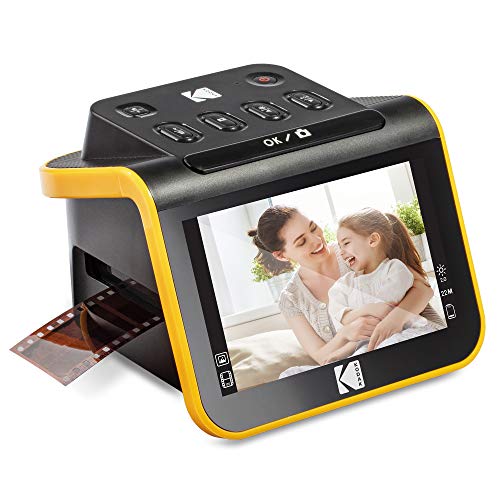
The Kodak Slide N Scan model provides a streamlined solution for digitizing a mix of color and black-and-white negatives (135, 110, 126) and 50mm slides. It features a 5” LCD for in-device previews, enabling quick edits and direct sharing. The scan-to-SD-card workflow is straightforward, and included adapters support multiple film formats to accelerate scanning. A rapid-load tray supports continuous operation, ideal for archiving larger collections. Key accessories include a 50mm slide holder and cleaning tools, plus USB and HDMI cables for connectivity.
JJC Mobile Film Scanner

This JJC option is designed for mobile users who want to convert 35mm and 120 format film quickly using a smartphone as the capture device. It includes a detachable wireless remote for hands-free shooting and a magnetic, adjustable brightness backlight. The system supports Type-C power and features a universal phone clamp compatible with most smartphones. While no dedicated software is bundled, users can rely on free apps to process and save scanned images. It’s ideal for on-the-go digitizing and sharing via mobile devices.
HP FilmScan
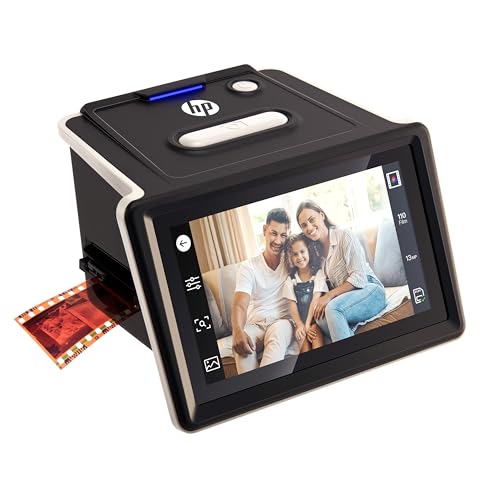
HP’s FilmScan emphasizes preservation with a 5” touch screen for straightforward previews and edits. It supports 135, 110, and 126 formats and can save files directly to an SD card or computer. The viewer mode is designed for quick sharing or display, and the device includes a simple, continuous-feed loading tray for easy importing of reels and slides. The model prioritizes accessibility and a user-friendly workflow, making it a solid option for casual collectors who want fast results without complexity.
Kodak Slide N Scan Max

The Slide N Scan Max extends the feature set with a larger 7” LCD and enhanced image options, including 13MP and 22MP digital film scanning capabilities. It supports a broader gallery mode for on-device viewing and editing, making it suitable for home or office display as well as archiving. The kit includes a 50mm slide holder, adapters for 135/110/126 films, a cleaning brush, and necessary USB-C cables, though HDMI cables may be required separately depending on setup. The larger display helps in precise previews and adjustments.
Magnasonic All-in-One 24MP
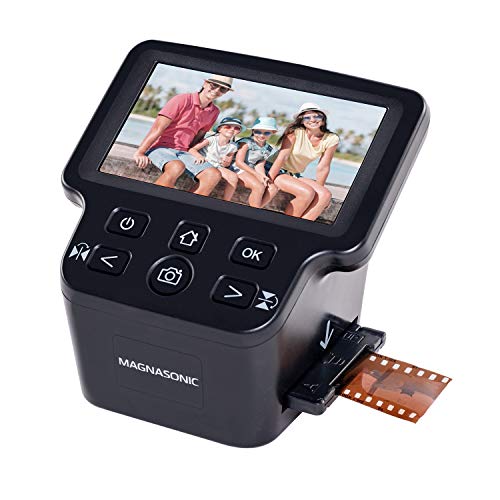
Magnasonic All-in-One offers a robust 24MP scanning capability with a built-in 5″ display and HDMI output for viewing on a larger screen. This model supports a range of formats, including 35mm, 110, 126, and Super 8, plus 135/126/110 slides. A built-in memory and SD card slot enhance portability and storage flexibility. The device is designed for users seeking a standalone solution with multi-format support and the option to display results on a TV or monitor via HDMI.
Buying Guide
- Compatibility: Confirm which film formats you routinely scan (35mm, 120, 126, slides) and ensure the device supports those formats with included adapters.
- Display and workflow: A larger LCD or gallery mode helps with quick previews and edits. Consider whether you need on-device editing or plan to transfer files to a computer or cloud workflow.
- Image quality: Look for megapixel resolution (e.g., 22MP, 24MP) and color accuracy. Some models offer higher resolutions but rely on upscaling; real-world results depend on sensor quality and scanning method.
- Storage and connectivity: SD card support is common; check card size limits. USB, HDMI, and PC transfer compatibility affect how you archive and share images.
- Ease of use: Feed trays and auto-loading reduce manual handling. A wireless remote or smartphone compatibility can enhance convenience, especially for batches.
- Portability vs. stationary use: Portable, phone-based scanners are handy for on-the-go digitizing, while larger displays are better for in-depth archiving at a desk.
- Cost of ownership: Consider included accessories (adapters, cleaning brushes) and whether HDMI cables or software are bundled. Some models require additional apps or peripherals for full functionality.
- Preservation goals: For archival quality, prioritize models with robust color capture, minimal noise, and reliable file formats (uncompressed or high-quality JPEG/RAW options).