For remote work, online classes, and streaming, a high-quality web camera can dramatically improve clarity, color, and focus. This guide highlights five top-ranked cameras that deliver sharp 4K or 1080p video, reliable auto-focus, and useful features like built-in mics or adjustable lighting. Each option supports Windows, macOS, and Chrome OS environments, making them versatile picks for any setup. Read on to compare capabilities and find the right fit for your needs and budget.
| Product | Brand | Key Benefit |
|---|---|---|
| IPEVO V4K Ultra HD | IPEVO | Ultra HD 8MP sensor with fast focus |
| j5create 360° Meeting Webcam | j5create | 360° viewing with built-in mic |
| OKIOLABS OKIOCAM S2 Pro | OKIOLABS | 4K UHD capture with smart pointer |
| THUSTAR 8MP Document Camera | THUSTAND | High-contrast document capture with LED lights |
| Nolansend 4K Webcam | Nolansend | Remote zoom and privacy features |
IPEVO V4K Ultra High Definition 8MP USB Document Camera

The IPEVO V4K uses an 8-megapixel sensor to deliver Ultra High Definition images up to 3264 x 2448 pixels. It supports high frame rates for smooth live streaming—up to 30 fps at full HD and up to 15 fps at full 3264 x 2448 resolution. A fast autofocus system reduces interruptions when switching materials, and the Sony CMOS sensor helps minimize noise and deliver accurate color in dim lighting. This makes it suitable for live demonstrations, distance learning, and web conferencing across Mac, Windows, and Chromebooks.
j5create 360 Degree All Around Meeting Webcam
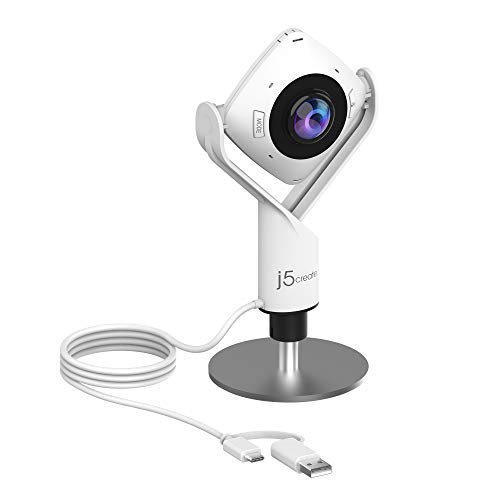
This camera offers 360-degree video conferencing with a built-in omnidirectional microphone. Six display modes provide flexible viewing angles, making it ideal for large online classes or collaborative sessions. It streams Full HD 1080p video at 30 Hz, providing clear, steady visuals for virtual meetings, lectures, and group projects. USB-C connectivity ensures easy setup with modern devices and platforms.
OKIOLABS OKIOCAM S2 Pro 13-MP USB Document Camera
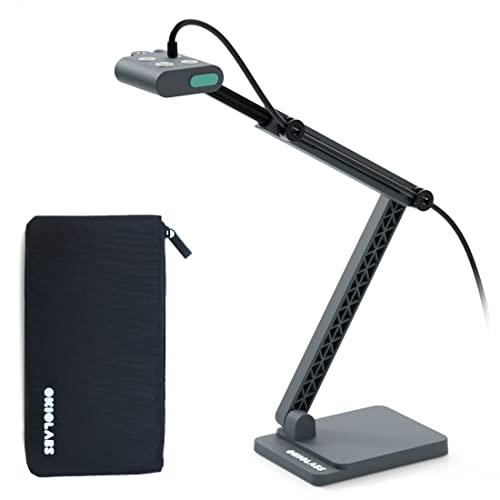
The OKIOCAM S2 Pro features a 13-megapixel sensor with 4K UHD capture options and a built-in light and microphone for rich, interactive presentations. The OKIOPoint smart pointer works with OKIOCAM Live software for document tracking and interactive demonstrations. Its high frame rate and accurate color reproduction support professional live demos, remote teaching, and hybrid conferences across major platforms.
THUSTAR 8MP Document Camera & Webcam 4K

This USB document camera supports 8MP imaging with 30fps for live transmission and 4K capture. It includes three-level LED lighting to illuminate objects clearly and features adjustable image reversal (flip) for flexible display during live chats or outputs. The camera can focus automatically with a single press and offers brightness controls to adapt to various lighting conditions, making it suitable for classrooms, studios, and remote demonstrations.
Nolansend 4K Webcam with Remote Control

The Nolansend webcam offers 4K (3840×2160) streaming with AI-assisted auto-zoom and remote control. It includes built-in stereo microphones and a privacy cover for security. The remote enables precise zooming up to 3x and direction controls, ensuring users can frame subjects accurately while maintaining smooth focus, ideal for lectures, webinars, and virtual conferences.
MERCANOVA Digital Camera DCAF40-3
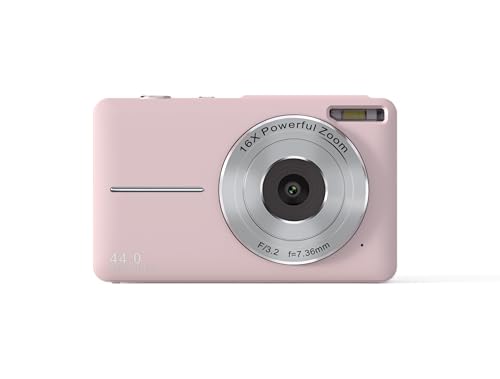
The MERCANOVA DCAF40-3 provides high pixel counts and versatile video options with 44MP photography capability and 1080p Full HD video. It includes 16x digital zoom and autofocus, making it a practical option for streaming, recording, and casual photography. Its compact design suits on-the-go creators, students, and remote teams seeking a multipurpose device.
Buying Guide: Key Purchase Considerations
- Resolution and image quality: 4K offers the sharpest detail, while 1080p is widely supported and sufficient for most video calls. Look for sensors with low-light performance and good color reproduction.
- Autofocus and zoom: Fast autofocus minimizes interruptions when moving between materials. Remote or software-based zoom can be helpful for demonstrations and distance learning.
- Lighting and exposure: Integrated LEDs or brightness controls help maintain clear images in dim environments. A camera with exposure adjustments can prevent under- or over-exposed footage.
- Audio quality: Built-in mics are convenient, but consider external mics for classrooms or conference rooms where voice clarity is critical.
- Connectivity and compatibility: Ensure USB-C or USB-A interfaces align with your devices. Verify compatibility with Windows, macOS, and Chrome OS, plus common conferencing platforms.
- Smart features: Some models offer smart pointers, tracking, or apps for interactive presentations, which can enhance engagement in live sessions.
- Privacy and security: A physical privacy cover or camera on/off indicators help protect privacy during non-use periods.
- Form factor and mounting: Consider desk space, stand stability, and whether a document-camera style is suitable for your teaching or demonstration needs.