Finding an affordable camera that delivers strong YouTube video quality can be challenging. This guide highlights five budget-friendly camcorders and vlogging cameras that balance price with useful features for creators, including 4K/5K/6K video, flip screens, night vision, external mics, wifi, and streaming capabilities. Each option is suitable for beginners and expanding channels, offering practical tools for crisp video, clear audio, and easy editing.
| Product | Brand | Key Features |
|---|---|---|
| 5K Video Camera Camcorder | BREGOO | 5K/20fps (4K/60fps), 64MP photos, 3″ rotatable screen, night vision, bundle included |
| 4K Video Camera Camcorder 64MP | FJFJOPK | 64MP/4K, 18x zoom, IR night vision, external mic, webcam, stabilizer |
| Video Camera, Full HD 1080P | VETEK | 1080P, 24MP, IR night vision, remote, webcam, pause function |
| 8K Video Camera Camcorder | FlyFrost | 8K/15FPS, 88MP, wifi, IR night vision, 3″ touch, external mic |
| Camcorder 6K 64MP | TALIHO | 6K/30FPS, 64MP, 4.0″ touch, IR night vision, wifi, remote |
Bregoo 5K Video Camera Camcorder for YouTube

The Bregoo model delivers cinema-grade detail with 5K resolution at 20fps, plus 4K at 60fps. It records 64MP photos on a high-sensitivity CMOS sensor, making it suitable for vlogs, travel, family events, and interviews. Its 3.0″ rotatable touch screen supports flexible framing for selfies, low-angle, and group shots. The creator bundle includes a 32GB card, dual batteries, tripod, external mic, remote, and more, enabling immediate starting points for YouTube beginners.
FJFJOPK 4K Video Camera Camcorder for YouTube
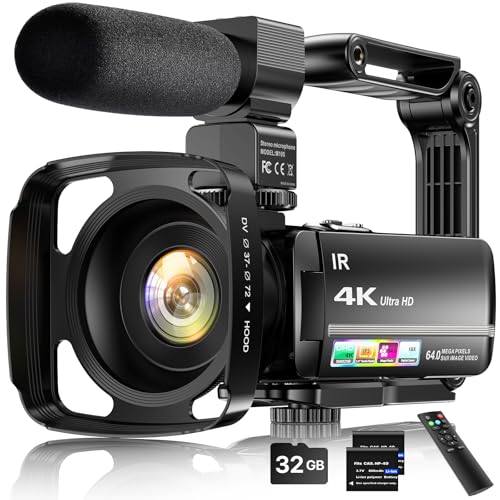
This 4K camera captures 64MP images with an 18x digital zoom and includes a handheld stabilizer for smooth motion. Its built-in lens hood minimizes glare, and IR night vision helps maintain quality in low light. The package includes an external stereo microphone and a webcam capability, enabling versatile use for YouTube tutorials, livestreams, and interviews.
VETEK Full HD 1080P Camcorder

Providing full HD 1080P video with 24MP photos, this VETEK camcorder includes infrared night vision, face recognition, webcam mode, and remote control. It supports pause and loop recording, making it practical for sit-down tutorials, unboxings, and travel vlogs. A standard tripod mount and easy transfer features help streamline content creation workflows for YouTube.
FlyFrost 8K Video Camera Camcorder

This model pushes toward higher-end capabilities with 8K video at 15FPS and 88MP stills. It features a 270°-rotating 3.0″ touch screen, 16x digital zoom, WiFi for quick sharing via apps, IR night vision, and a bundled external microphone. The camera also functions as a webcam, facilitating live streaming and cross-platform broadcasting for YouTube creators.
TALIHO 6K 64MP Vlogging Camcorder

The TALIHO option records in 6K at 30FPS with 64MP photos and a 4.0″ touch screen that rotates up to 270 degrees. It includes infrared night vision, WiFi functionality, and a 2.4G remote control. This configuration suits creators who want higher-resolution video plus flexible framing and remote operation for solo production or multi-angle shoots.
Buying Guide: Key Purchase Considerations
- Resolution and frame rate: For YouTube, 4K or higher remains ideal for futureproofing, but 1080p can be sufficient for budget setups. Consider cameras offering at least 60fps in your target resolution for smooth motion.
- Low-light performance: Infrared night vision and a good sensor help in dim environments. Models with night vision are beneficial for indoor lighting constraints or vlogs filmed at night.
- Stabilization and motion capture: Built-in stabilization or an included handheld stabilizer reduces shakiness during walking shots or on-the-go filming.
- Audio quality and inputs: External microphones improve sound significantly. Look for cameras that include a mic input or bundle an external mic.
- Framing flexibility: A rotatable or flip screen (270 degrees preferred) makes selfie shots and vlogging easier, especially for solo creators.
- Connectivity: WiFi or app-based remote control simplifies file transfer and editing workflows. Webcam capability can save time on live streams or calls.
- Storage and power: Larger memory cards and extra batteries extend shooting time. Check compatibility with widely available SD cards and battery availability.
- Bundle value: Be mindful of included accessories. Beginner-friendly bundles often include cards, mics, tripods, and remotes, which reduce initial setup costs.
- Durability and form factor: A sturdy build and portable design help when shooting in varied locations. Consider weight and battery life for extended sessions.
- Upgrade path: If you expect to scale your channel, choose a camera with features that remain useful as production quality increases, rather than a device with limited future potential.
These options provide a range of capabilities at accessible prices, enabling creators to produce higher-quality YouTube content without a large upfront investment. When selecting, align the camera’s strengths with your channel type—sit-down tutorials, travel vlogs, live streams, or on-the-go filming—and plan how you’ll handle audio, lighting, and editing workflows.