Choosing a reliable security camera setup for a PC or desktop environment requires balancing video quality, audio clarity, privacy features, and ease of use. This guide highlights five top options that fit different needs—from everyday video calls and streaming to home security monitoring. Each product is assessed for 1080p or higher clarity, noise-canceling audio, privacy options, and straightforward Plug & Play setup. Whether you need a webcam for professional meetings or a discreet indoor security camera with remote access, these picks aim to help you decide with confidence.
| Product | Brand | Key Features (Highlights) |
|---|---|---|
| Shcngqio 1080P HD Webcam | Shcngqio | 1080p, wide-angle, noise-canceling mic, auto light correction, privacy cover, plug & play |
| Logitech Brio 101 | Logitech | Auto-Light Balance, built-in mic, GameChat compatibility, color-adjusted brightness |
| NexiGo N60 1080P Webcam | NexiGo | 1080p, 110° wide FOV, adjustable FOV/exposure, built-in noise-canceling mic |
| NOBEYSTON Hidden Spy Camera | NOBEYSTON | HD 1080p, hidden/wireless, remote viewing via WiFi, indoor/outdoor versatility |
| DEKCO 2K Outdoor Security Camera | DEKCO | 2K, motion tracking, dual-way audio, floodlight, remote monitoring, weatherproof |
Shcngqio 1080P HD Webcam With Microphone

The Shcngqio TWC29 webcam delivers 1080p Full HD clarity with a wide-angle lens, ideal for video calls, streaming, and online teaching. With 30fps performance, users benefit from smooth video and vivid colors that support clear communication during professional meetings or content creation. The built-in noise-canceling microphone reduces ambient noise, helping listeners hear you clearly in busy environments. Automatic light correction adapts to varying lighting, ensuring you look presentable whether in dim rooms or bright spaces. The privacy cover provides quick control over camera access, and plug-and-play USB connectivity makes setup fast and hassle-free for PC and Mac users alike.
Key considerations for this webcam include field of view and audio quality. The wide-angle design helps capture more of the room, which is useful for presentations or family gatherings on a PC. The microphone’s noise reduction is helpful in shared workspaces, but for larger conference rooms, you might prefer a dedicated microphone setup. Power and software support are straightforward, and the camera works well with popular video conferencing platforms like Zoom and Skype, as well as streaming software. Overall, it’s a versatile all-purpose webcam suitable for daily PC use and light security monitoring in indoor settings.
Logitech Brio 101 Full HD Webcam

The Logitech Brio 101 is built for high-quality video calls and streaming on a PC, with a strong emphasis on image quality and smart brightness adjustments. The Auto-Light Balance feature, powered by RightLight, helps minimize shadows and balance exposure, producing clearer visuals during meetings or content creation sessions. The built-in microphone provides clear audio pickup for standard meeting environments, while compatibility with popular platforms like Zoom and Microsoft Teams ensures seamless integration. This model is particularly suitable for users who prioritize color accuracy, stable performance, and reliable background lighting adjustments in desk setups and home offices.
From a security perspective, Brio 101 is not a dedicated security camera but a robust webcam that doubles as a PC-facing camera for communications and occasional monitoring. Use cases include remote work, live streaming, and basic room monitoring when paired with software that records or streams to your PC. Given its plug-and-play design and broad platform support, it remains a dependable option for those who want a single device for both professional communications and simple PC security tasks.
NexiGo N60 1080P Webcam

The NexiGo N60 offers 1080p resolution with a 110° wide field of view, making it well-suited for compact workspaces where you want to capture more of the environment in a single frame. Its fixed focal length delivers a sharp image at typical indoor distances, and the included software allows you to adjust exposure and zoom to tailor the view for presentations, video calls, or streaming. The built-in microphone reduces ambient noise, helping ensure your voice remains clear in conversations or virtual security checks. Chromatic accuracy and color balance are generally reliable for typical PC use and occasional surveillance tasks when connected to a PC or laptop.
For security-minded users, N60 isn’t a dedicated home security camera, but its video feed can be used for monitoring purposes through software that supports PC-based recording. It’s a flexible option for those who want a single device that can serve as a webcam and a basic monitoring tool, particularly in small home offices or deskside setups where discreet, plug-and-play operation matters.
NOBEYSTON Hidden Spy Camera Kit
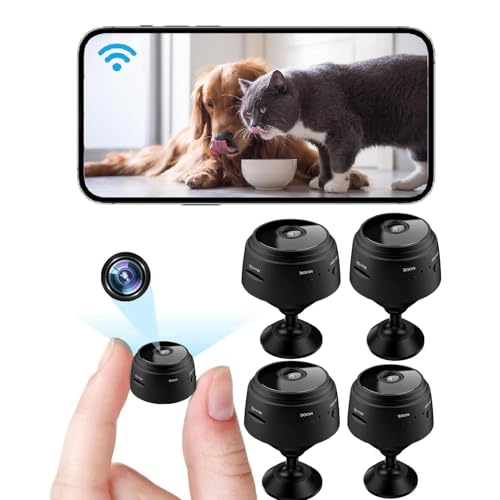
The NOBEYSTON Hidden Spy Camera is designed for discrete monitoring with a full 1080p resolution and hidden form factor. While it operates as a camera that can connect to WiFi for remote viewing, it is intended primarily for ongoing surveillance in homes or offices. The 2.4 GHz WiFi compatibility allows real-time viewing through a smartphone or PC, depending on the app ecosystem. This device can be useful for monitoring caregivers, pets, or entryways when you need a subtle, always-on presence. It should be noted that local laws and privacy considerations apply to the use of hidden cameras in shared spaces.
In PC contexts, this device shines as a covert monitoring tool rather than a primary video conferencing camera. It supports remote viewing from a PC, which can be valuable for security-conscious users who want a discreet off-desk placement. Users should ensure they adhere to local regulations and obtain proper consent where required. The device’s compact form factor allows placement behind objects or within decor, providing flexible security coverage in home or office environments.
DEKCO 2K Outdoor Security Camera

The DEKCO outdoor security camera provides 2K resolution with smart motion tracking and 2-way audio, making it suitable for exterior surveillance and remote monitoring from a PC or mobile device. The ability to send instant motion alerts helps users stay informed about activity around the property, while the 2-way audio enables communication with visitors or intruders. This camera typically includes features like app-based access, remote live viewing, and an optional siren or alert sounds when motion is detected. Weather resistance and robust connectivity ensure steady monitoring in varied outdoor conditions.
For desktop users, DEKCO can serve as part of a broader security system where footage is reviewed on a PC, downloaded for evidence, or monitored via a web interface. Its higher resolution and wider field of view enhance coverage compared with typical indoor webcams, making it a strong option for users who want a more capable outdoor camera that still integrates with home networks and PC-based monitoring workflows.
Buying Guide: Key Purchase Considerations
- Purpose and placement: Distinguish between a PC webcam for meetings and a stand-alone security camera for surveillance. Choose models with appropriate lens angles, field of view, and mounting options accordingly.
- Resolution and frame rate: For clear chats and streaming, 1080p at 30fps is generally sufficient. For security tasks, higher resolutions (2K/4K) offer more detail in recorded footage but require more storage and bandwidth.
- Audio quality: Look for noise-canceling microphones for environments with ambient noise. Two-way audio is essential for security cameras with visitor interaction or intercom-style functionality.
- Privacy and security: Privacy covers or physical shutters are important for webcams. For WiFi cameras, ensure strong encryption, secure pairing, and regular firmware updates to mitigate vulnerabilities.
- Software ecosystem and compatibility: Verify compatibility with your preferred video conferencing platforms (Zoom, Teams, Skype), streaming software, and any security apps you may use on PC. Software-enabled features like auto exposure, white balance, and digital zoom can improve usability.
- Power and connectivity: USB webcams are easy to deploy, while outdoor cameras may require PoE or specific power options. Consider weather resilience, mounting flexibility, and cable management for secure PC setups and home surveillance.
- Privacy implications and legality: Use devices in compliance with local laws. Obtain consent when monitoring other people in shared spaces and avoid recording in restricted areas without disclosure.
- Storage and retention: For security cameras, plan storage capacity and retention periods. Evaluate cloud vs. local storage options and ensure network bandwidth supports continuous recording if needed.
- Price-to-value balance: Higher resolution and advanced features add cost. Assess your core needs—video calls, streaming, or robust home surveillance—and pick a model that delivers the best value for your setup.
Across these options, users get a spectrum of capabilities tailored to desktop and PC use. Webcams like Shcngqio and NexiGo emphasize ease of use and meeting-room readability, while Logitech Brio 101 offers enhanced lighting balance for professional environments. For discreet monitoring, the NOBEYSTON hidden camera provides covert operation, and the DEKCO outdoor camera expands to a stronger outdoor surveillance approach with motion tracking and two-way audio. When choosing, align features with your room layout, privacy expectations, and whether the primary need is quality video calls or reliable desktop-based security monitoring.