The following article highlights five top USB video capture cards that work well with laptops for streaming, recording, live meetings, and more. Each option supports common platforms and offers features like low latency, high definition capture, and plug-and-play setup. Use this guide to compare compatibility, resolutions, and ease of use to find the best match for your laptop-based workflow.
| Product | Brand | Key Benefit | Max Input / Output |
|---|---|---|---|
| Guermok Video Capture Card | Guermok | Versatile 4K input, 1080p 60fps output, compact and portable | 4K@30Hz input / 1080p60 output |
| Audio Express AXHDCAP | Audio Express | Ultra-low latency with broad OS support | 4K@30Hz input / 1080p@30Hz output |
| Papeaso Video Capture Card | Papeaso | Low latency with HDMI loop out for real-time streaming | 4K@60Hz input / 1080p@30Hz output |
| UGREEN 2K@30Hz Capture Card | UGREEN | Dual USB interfaces (A and C) with 2K 30Hz, 1080p 60fps backward compatibility | HDMI input 4K@30Hz; output 2K@30Hz / 1080p60 |
| Rybozen 4K HDMI Capture Card | Rybozen | 4K input with 1080p 60fps recording and true plug-and-play | 4K@60Hz input / 1080p60 output |
Guermok Video Capture Card
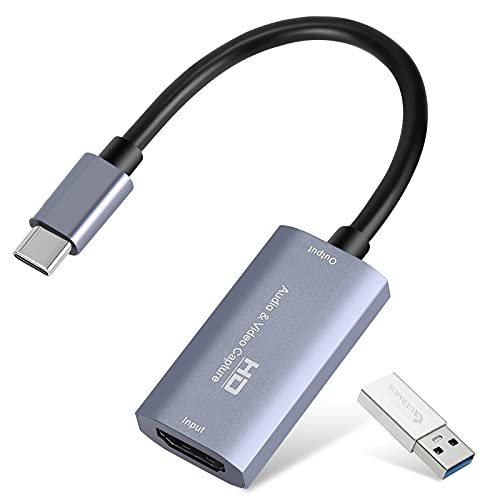
The Guermok video capture card offers 4K input at 30Hz and 1080p60 output, connected via USB-C or USB-A. It emphasizes low latency for live gaming, streaming, and real-time recording, with aluminum housing for heat dissipation. The device is plug-and-play and portable, making it suitable for on-the-go streaming, online meetings, and sharing gameplay or presentations from a laptop. It supports multiple platforms including OBS and popular console-to-PC workflows.
Key Features
- 1080P 60FPS capture with 4K@30Hz input
- USB-C and USB-A interfaces for broad compatibility
- Ultra-low latency with aluminum heat-dissipation housing
- Plug-and-play, no external power required
Audio Express AXHDCAP 4K HDMI Video Capture Card

The AXHDCAP from Audio Express is designed to deliver a seamless 4K input experience with 1080p USB output, accompanied by crisp stereo sound. It highlights ultra-low latency for real-time previews and easy direct recording to a hard drive. Compatible with Windows, macOS, and Linux, it supports streaming to Twitch, YouTube, OBS, Zoom, and more. The device is plug-and-play and does not require a driver, making it a straightforward option for mixed-device setups.
Key Features
- HDMI input up to 4K@30Hz; USB output up to 1080P@30Hz
- Ultra-low latency for real-time preview
- Broad OS compatibility; streaming-ready with OBS and Zoom
- Driver-free plug-and-play
Papeaso Video Capture Card

Papeaso’s capture card emphasizes ultra-low latency with an HDMI loop-out, enabling real-time gameplay and streaming without delays. It records up to 1080p at 60fps directly to a hard drive and supports streaming to Twitch, YouTube, OBS, and VLC. No driver installation is required, and the compact form factor makes it easy to carry for on-the-go sessions or classroom usage.
Key Features
- HDMI input up to 4K@60Hz; 1080p output @30Hz
- HDMI loop-out for real-time streaming and multiplayer play
- Driver-free; plug-and-play with USB connection
- Compact and portable for travel or teaching setups
UGREEN 2K@30Hz Capture Card
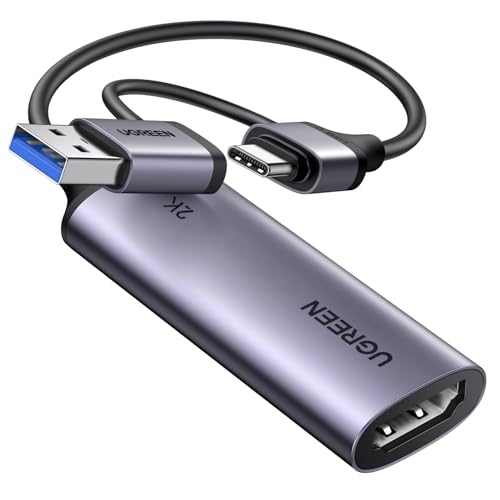
UGREEN’s capture card supports 2K input at 30Hz with fallback to 1080p60 output, and features both USB-A and USB-C connectivity. It targets multi-device streaming, enabling HDMI input from cameras or consoles to be captured on a laptop for live streaming on OBS or social platforms. It is backward compatible with USB 2.0 and designed for low-latency gaming and recording scenarios.
Key Features
- HDMI input up to 4K@30Hz; output 2K@30Hz and 1080p60
- USB-A and USB-C interfaces for broad device compatibility
- Low latency with USB 3.0 performance; backward compatible with USB 2.0
- Designed for Switch, Xbox, PS4/PS5, and PC capture
Rybozen 4K HDMI Capture Card
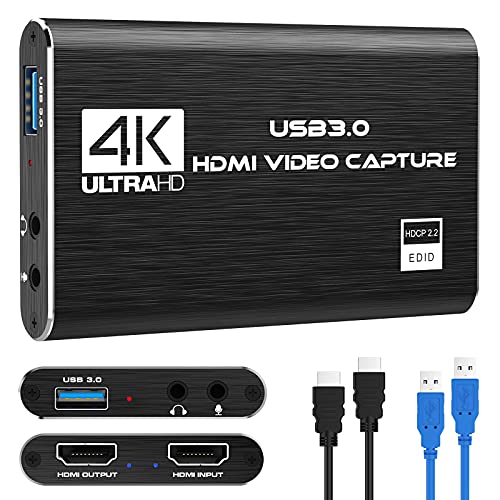
Rybozen’s capture card offers a 4K input with 1080p 60fps output, featuring true plug-and-play operation. It is ideal for gaming, streaming, or conferencing, and supports devices such as cameras and consoles connected to a laptop. The device is designed for easy setup and broad compatibility with streaming software like OBS and PotPlayer.
Key Features
- 4K input; 1080p60 output
- Plug-and-play; no driver installation required
- Wide compatibility with Windows and Mac, plus OBS support
Buying Guide: Key Purchase Considerations
When selecting a video capture device for a laptop, consider the following aspects to ensure you choose a model that fits your needs.
- Resolution and frame rate: Determine whether you need 4K input with 1080p or 2K output, and what frame rates your workflow requires (30fps vs 60fps).
- Interface and compatibility: USB-C vs USB-A, driver-free operation, and compatibility with your laptop’s OS (Windows, macOS, Linux) influence setup ease.
- Latency: Ultra-low latency is important for live streaming and gaming to minimize delay between input and display.
- Power and portability: Plug-and-play devices with compact designs are ideal for travel, classrooms, and on-the-go setups.
- Output options: Some devices offer HDMI loop-out or multi-port support, which can enhance live collaboration and multi-person streaming.
- Software compatibility: Ensure the capture card works smoothly with OBS, Zoom, Teams, VLC, PotPlayer, or Twitch/YouTube streaming workflows.
In practice, the best pick balances your preferred resolution, latency tolerance, and device ecosystem. For laptop use, models with USB-C compatibility and plug-and-play setup tend to provide the most seamless experience, particularly when paired with modern streaming software on Windows or macOS.