Choosing a camera with dependable wireless connectivity starts with understanding how a wifi-enabled card or module integrates with your device. This guide highlights five prominent camera options that emphasize built-in wifi capability, making setup simple and keeping footage accessible on the go. Each product below offers distinct strengths—from high-resolution recording to remote viewing and motion alerts—so you can compare how they fit different security or vlogging needs. The selections focus on consumer-friendly wifi features, battery life, storage options, and ease of installation.
| Product | Brand | Key WiFi Feature | Notes |
|---|---|---|---|
| 4K Digital Camera For Photography With WiFi | TEFTYMON | Built-in WiFi for sharing and remote control | Ideal for on-the-go creators and enthusiasts |
| 4K WiFi Indoor Camera | Funstorm | 2K/2K+WiFi with cloud/integrated storage | Indoor home or office monitoring |
| Kasa Smart Indoor Pan-Tilt Camera | Kasa Smart | 2.4G WiFi, motion tracking, 360° view | Smart home compatibility |
| 4K Digital Camera For Photography With WiFi (Budget Variant) | Bofypoo | WiFi sharing and remote shooting | Compact travel-oriented option |
| TERUNSOUl 4K+4K Dash Cam | TERUNSOUl | Built-in WiFi for dash cam streaming | Dual-channel 4K recording |
TEFTYMON 4K Digital Camera With WiFi

The TEFTYMON 4K Digital Camera with WiFi offers 4K video and up to 64MP photos with autofocus, making it suitable for creators who need high-resolution content and easy wireless sharing. A 3.0-inch IPS 180° flip screen supports selfie framing and vlogging, while a built-in flashlight helps in low-light environments. The camera supports WiFi for quick transfer of files to smartphones, enabling remote shooting and sharing on social platforms. This model is designed for travelers and content creators who prioritize both image quality and convenient wireless workflow.
Key considerations include the balance between 4K recording quality and battery life, the reliability of built-in WiFi during mobile use, and the ease of using the companion app for remote control and image transfer. The device is well-suited for social media creators who want a compact, capable camera with straightforward wireless connectivity. Users should ensure their mobile device supports the camera’s app and that their filming environments have adequate WiFi range for transfers.
Funstorm 4K WiFi Indoor Camera
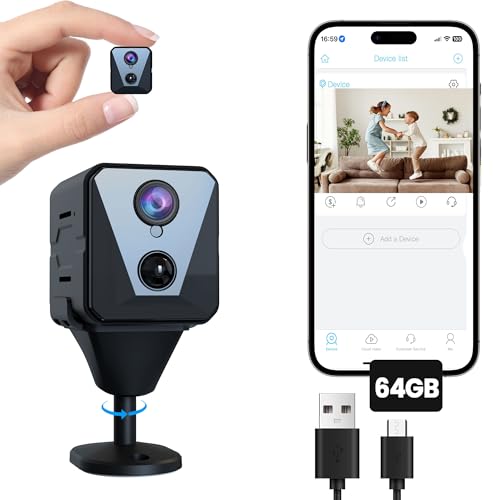
The Funstorm 4K WiFi Indoor Camera emphasizes 2K/2K-like clarity with a wide 120-degree angle and night vision features, supported by built-in WiFi for seamless file transfer and remote viewing. It includes realistic motion detection and instant alerts, useful for monitoring homes, offices, or pet spaces. Local and cloud storage options provide flexible recording solutions, while the three features deliver clear footage for everyday surveillance and security needs. The camera is designed for consumers who value an easy plug-and-play setup with reliable wireless streaming and access from a mobile device.
Considerations include whether you require local storage, cloud backup, or both, how responsive the app is for live viewing, and how well the 120-degree field of view covers your space. Ethernet connections are not required, but ensure your WiFi network is stable for uninterrupted streaming and notifications.
Kasa Smart Indoor Pan-Tilt Camera

The Kasa Smart EC71 offers full-room coverage with 360° horizontal and 113° vertical pan-tilt movement, paired with 2.4GHz WiFi connectivity. Its motion tracking automatically follows moving subjects, delivering real-time alerts that help distinguish between pets and people. The camera’s compatibility with Alexa and Google Home makes it a strong choice for integrated smart homes. Users benefit from intuitive app controls, easy setup, and reliable notifications, which are essential for monitoring infants, pets, or entryways.
Key purchase considerations include network stability on the 2.4GHz band, compatibility with existing smart home ecosystems, and whether you prefer local storage (SD card) or cloud backups. The EC71 is well-suited for households seeking a balance of advanced features and straightforward operation in a single, WiFi-connected package.
TERUNSOUl 4K Dash Cam With WiFi
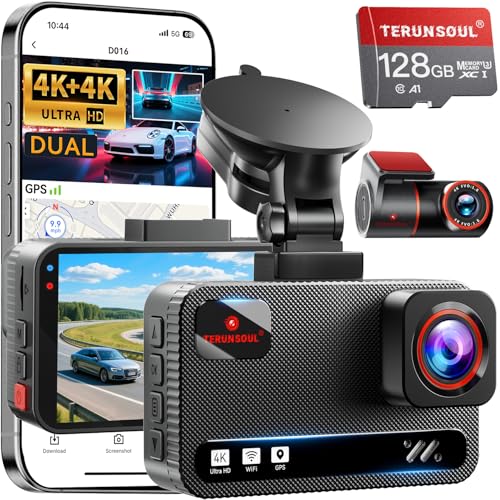
The TERUNSOUl 4K+4K dash cam provides front and rear recording in ultra high-definition 4K across both channels, with a 170° wide-angle front lens and a reliable G-sensor for event capture. Built-in WiFi enables easy file transfer to mobile devices and remote viewing, which is useful for reviewing driving footage or sharing incidents with others. The device also supports large microSD cards for extended storage, making it suitable for those who require robust on-the-road documentation and accessible wireless viewing.
Considerations when evaluating dash cams with wifi include storage capacity, the quality of night vision, and how well the app supports live streaming and quick video retrieval. It is also important to verify compatibility with your smartphone’s operating system and ensure the dash cam’s wifi range is adequate for comfortable wireless access in your vehicle.
HOSAFE.COM 4G LTE Cellular Security Camera With Sim Card

This model highlights a no-internet-needed approach with solar power and its own SIM card, enabling 4G LTE connectivity for surveillance in remote sites. The camera supports pan and tilt, 2K color night vision, and motion detection with instant mobile alerts. It is designed for outdoor installations on job sites or locations without reliable WiFi or power lines. The built-in 4G plan and solar capability offer flexibility in remote monitoring scenarios, though ongoing service requires a subscription after a trial period.
Key considerations include whether remote locations with limited network infrastructure can maintain consistent cellular coverage, the availability of a data plan, and the reliability of solar charging in varying weather. This option is best for remote security tasks where wired power or traditional WiFi is unavailable, and a cellular connection is acceptable for continuous monitoring.
Buying Guide: Key Purchase Considerations And Comparisons
- WiFi vs. cellular: Decide whether you need WiFi-based cameras for home networks or cellular-enabled devices for remote locations. WiFi is typically cheaper and easier to set up, while cellular solutions work where WiFi is unavailable.
- Power sources: Consider whether the camera is corded, battery-powered, or solar-assisted. Solar-powered designs are ideal for remote deployments but require sunlight for optimal performance.
- Storage options: Look for local storage (SD cards) and cloud backups. Cloud storage adds ongoing costs but can be crucial for retaining footage after events.
- Resolution and night vision: Higher resolutions (2K/4K) provide clearer detail, while robust night vision is essential for low-light surveillance. Check features like WDR, infrared, and color night vision capabilities.
- Motion detection and alerts: Evaluate the sensitivity of PIR or AI-based detection, and whether instant mobile alerts are supported. Consider whether you need person-only detection or general motion alerts.
- Field of view and pan/tilt: A wide field of view and responsive pan-tilt mechanisms improve coverage. For outdoor use, weather resistance and mounting flexibility matter.
- App ecosystem and compatibility: Ensure the camera’s companion app works with your smartphone, and verify compatibility with smart-home ecosystems (Alexa, Google Home).
- Costs beyond hardware: If using cellular or cloud storage, factor in ongoing subscription fees and data plans.
- Security and privacy: Review encryption standards for data transmission and storage, and assess manufacturer update policies for firmware security.
In summary, selecting the best wifi-enabled camera depends on your environment (indoor vs outdoor, urban vs remote), power availability, storage preferences, and how you prioritize real-time alerts and remote access. The five options highlighted here provide a spectrum—from creator-focused WiFi cameras to rugged cellular solutions—to help users identify the model that best fits their surveillance or content-creation workflow.