If you want hands‑free control for photos and videos, a wireless remote for camera is the right tool. This guide highlights five reliable options that work with iPhone, Android, and various cameras. Ideal buyers include selfie enthusiasts, social creators, students documenting events, and anyone wanting steadier shots from a distance. The products below balance ease of use, range, and compatibility, helping you pick the best fit for your setup. A quick buying table follows to compare key details at a glance.
| Product | Brand | Best For | Key Benefit |
|---|---|---|---|
| Wireless Camera Remote Shutter Shutter for Smartphones (2 Pack) | Zttopo | Selfies and casual photos | Compact, pocket‑friendly, up to 30 ft |
| Wireless Camera Remote Control with Zoom for iPhone & Android | Voinap | Content creators needing zoom and quick front/rear switch | Zoom, camera switching, video features |
| 2 Pack Wireless Camera Remote Control | Skoutag | Distance shots with Instagram/Snapchat use | Dual pack, long range, lightweight |
| CamKix Camera Shutter Remote | CamKix | General selfies and groups | Stable pairing, pocketable, affordable |
| ATUMTEK Camera Remote Shutter (2 Pack) | ATUMTEK | Extended range and reliability | Bluetooth 5.2, long battery life |
Wireless Camera Remote Shutter for Smartphones (2 Pack) – Zttopo

Best for: users seeking a compact, easy‑to‑carry remote for selfies or quick tripod shots. This two‑pack keeps a spare in a pocket, bag, or keychain. The device supports long press for video and short press for photos with a 10 m (30 ft) range, and it’s compatible with popular social apps like Instagram and Snapchat.
Why selected: It emphasizes portability and straightforward operation, making it ideal for travelers, students, or anyone who wants a simple backup remote. The hands‑free shutter helps reduce camera shake on steady shots.
Caution: Range may vary in crowded environments or with obstructed lines of sight, and the remote is best used closer to the phone for consistent results.
Wireless Camera Remote Control with Zoom – Voinap

Best for: content creators who want more control than a standard shutter, including zooming and quick front/rear camera switching. This remote adds a zoom function (with accessibility setting) and a front/rear camera toggle, plus features for scrolling pages and adjusting playback in videos.
Why selected: The combination of zoom and camera switching supports more dynamic shooting scenarios, such as vlogs or selfies with zoom detail. It’s especially helpful when you want to switch perspectives without touching the device.
Caution: Zoom and some multitasking features rely on app settings; ensure accessibility options are configured for your device prior to shooting.
2 Pack Wireless Camera Remote Control – Skoutag

Best for: users who want a reliable two‑pack option for social media use, especially those who rely on Instagram or Snapchat. The remote handles pictures and video start/stop, with a maximum 10 m range and a compact form.
Why selected: The dual pack provides value for households or teams who need more than one remote for group shoots, while maintaining light weight and easy pairing after initial setup.
Caution: It may not support all tablet platforms or certain apps that require more advanced permissions; verify compatibility with your preferred app before purchase.
CamKix Camera Shutter Remote – CamKix
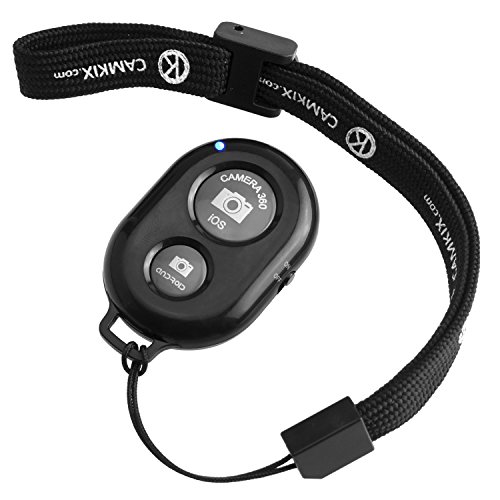
Best for: buyers who want a classic, reliable Bluetooth shutter with a lightweight profile. The CamKix remote is designed for selfies, group photos, and long‑distance triggering up to 30 ft (10 m).
Why selected: It pairs quickly and sticks to a minimal footprint, making it convenient for everyday carry on a keychain or in a small pocket. It’s a solid all‑rounder for casual photographers.
Caution: Some users report occasional pairing delays depending on device and OS version; a quick re‑pair usually resolves it.
ATUMTEK Camera Remote Shutter – Two Pack

Best for: users seeking extended range and strong Bluetooth 5.2 reliability, with a long battery life and a two‑pack for backups or multi‑device use. It supports extended operation up to 10 m.
Why selected: The upgrade to Bluetooth 5.2 offers improved compatibility and lower latency, suitable for vloggers or event shooters who need dependable performance in varied environments.
Caution: Battery life is good with typical daily use, but like all small remotes, occasional battery changes are expected over time.
Buying Guide: How To Choose The Right Wireless Camera Remote
- Range And Environment: If you shoot outdoors or in crowded spaces, consider a remote with robust range (up to 30 ft/100 ft depending on model) and reliable connection type (Bluetooth vs radio frequency).
- Compatibility: Verify device compatibility (iOS, Android, or specific camera models). Some remotes require specific app support or accessibility settings.
- Features: Do you need zoom, front/rear camera switching, page turning, or video start/stop? Choose a model that bundles the features you actually use.
- Battery Life: Look for CR2032 or similar coin batteries and documented expected life. Long‑life designs reduce replacement frequency during travel or shoots.
- Portability: If you travel often, prioritize compact size, light weight, and included wrist straps or keychain compatibility.
- Ease Of Use: A simple pairing process and minimal setup help ensure quick readiness for spontaneous shots.
Frequently Asked Questions
- Do wireless camera remotes work with iPhone and Android devices? Yes. Most are designed for both platforms, though some features may vary by OS.
- What is a typical range for wireless remotes? Common ranges are 10 meters (30 feet) and up to 30 meters (100 feet) for certain radio‑frequency models.
- Can remotes trigger video recording as well as photos? Many do; check the product features for start/stop video capability.
- Is Bluetooth required for all remotes? Most modern remotes use Bluetooth, but some use radio frequency (RF) or other wireless technologies for longer ranges.
- Will a remote work with smartphones in cases or with screen protectors? In most cases, yes, but very bulky cases may affect the sensor alignment or comfort of button presses.